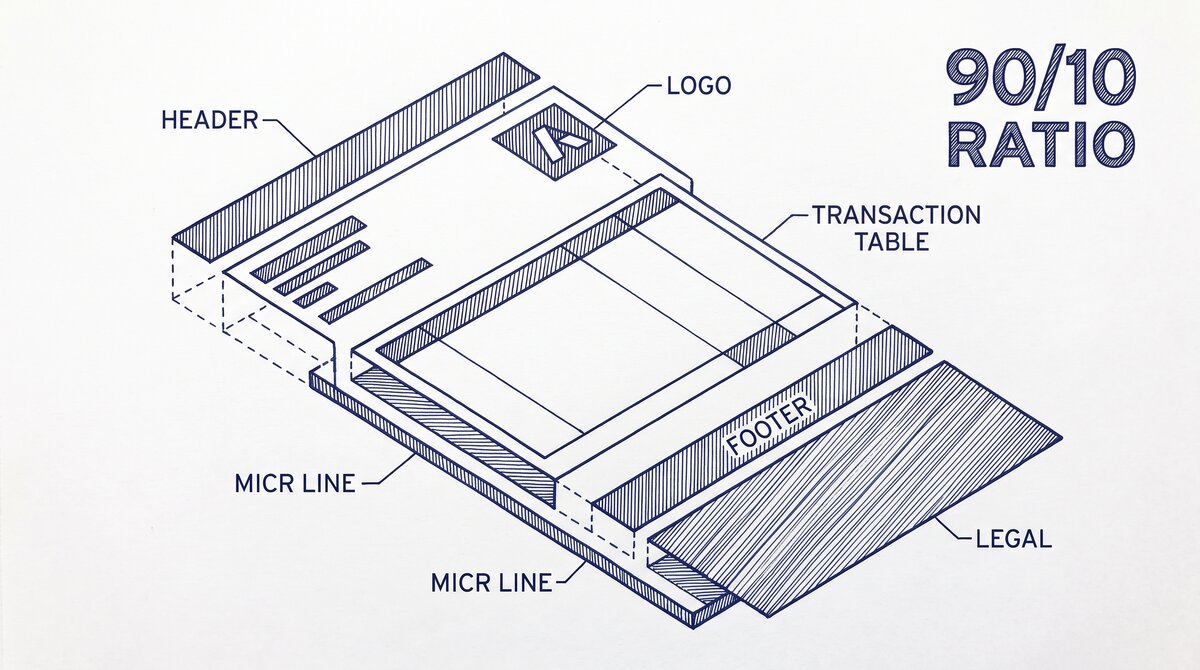

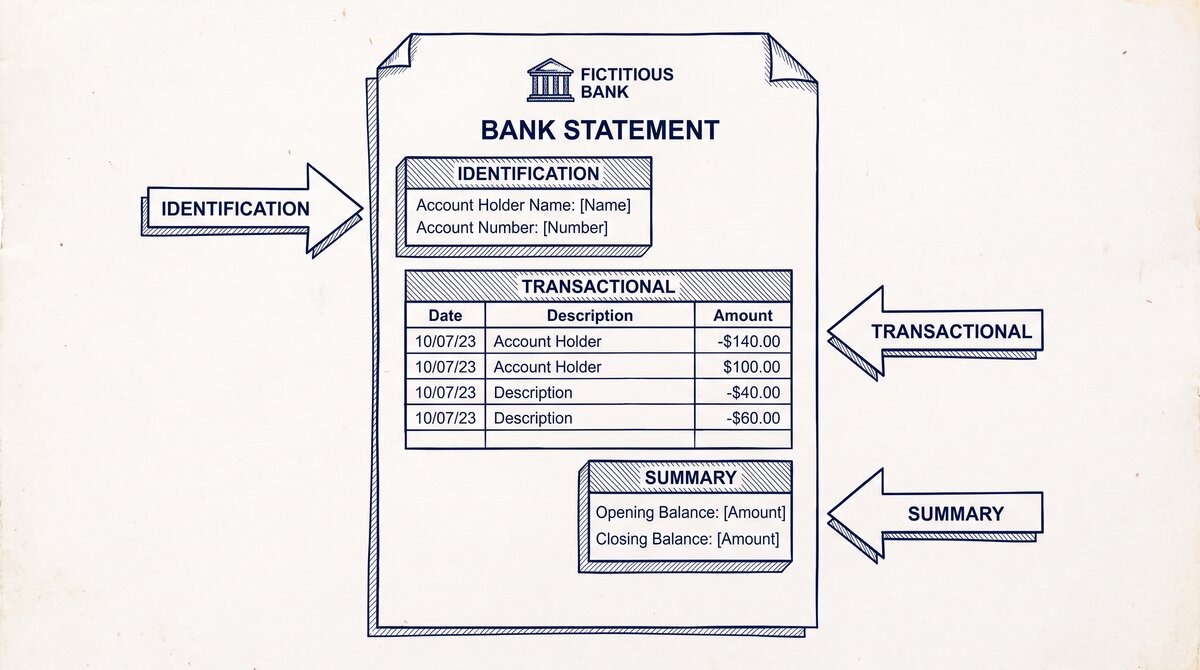
A bank statement has 6 standard sections in the same order, regardless of which bank issued it. The short answer: every bank statement is built from the same 6 sections in the same order.
The header identifies the account, the summary shows the activity, the table shows the transactions, the fee schedule shows the charges, the interest calculation shows the earnings, and the footer contains the disclosures. Knowing the 6 sections makes every statement easier to read.
Why Anatomy Matters
Knowing the 6 sections of a bank statement makes every statement easier to read, verify, and use. The customer who knows the anatomy can find any information in 10-30 seconds, even on an unfamiliar statement from a new bank. The customer who doesn’t know the anatomy may spend 10-30 minutes searching for the same information, and may miss key details (like fees or interest).
For the use cases (tax, loan, rental, bookkeeping), the anatomy is the foundation. The 4 use cases each require specific sections: tax (transaction table for expense categorization), loan (transaction table for income verification), rental (transaction table for income and savings verification), bookkeeping (transaction table for category assignment). All 4 use cases start with the transaction table.
The 6 Sections
6 sections that appear in the same order on every US bank statement:
1. Header. The top section identifies the account and the statement period. The header typically has: bank name and logo, account holder name, account number (often masked to the last 4 digits), statement period (e.g., January 1 to January 31), and the opening balance. The header is the first thing to verify when reviewing a statement.
2. Account summary. The summary shows the activity for the period. The summary typically has: total deposits, total withdrawals, total fees, total interest, and the closing balance. The summary is the quick-reference section and is what most customers look at first.
3. Transaction table. The longest section shows every transaction for the period. Each row has: date, description, amount (debit or credit), and balance. The table is the working section and is the input to most analysis (tax, loan, rental, bookkeeping).
4. Fee schedule. The section that shows any fees charged during the period. The fees may be itemized or summarized. The fees include: monthly maintenance fee, overdraft fee, ATM fee, foreign transaction fee, and any other charges. The fee schedule is the source of truth for any unexpected fees.
5. Interest calculation. The section that shows the interest earned (for savings, money market, or interest-bearing checking) or the interest charged (for credit cards or loans). The interest calculation shows the daily balance method, the interest rate, and the interest amount. The interest section is often missed but is important for tax (interest is taxable income) and for verification.
6. Footer. The bottom section contains the disclosures: customer service contact, FDIC notice, error resolution procedures, and any other required disclosures. The footer is the legal section and is the source of truth for the customer’s rights.
Turn That PDF Into a Spreadsheet in Minutes
You've seen how to do it manually — now let the tool handle the heavy lifting. Upload your bank statement and get Excel, CSV, or QBO in a few clicks.
Try It FreeThe 5 Key Data Points
5 specific data points that are most important for most uses:
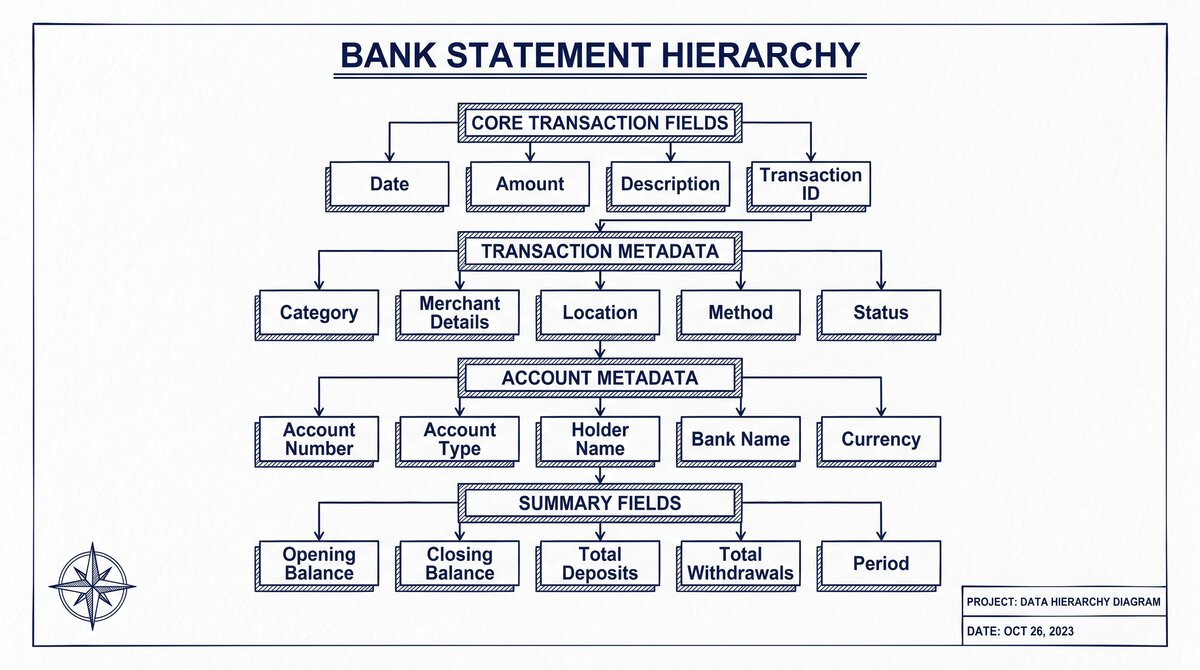
1. Account number. The unique identifier for the account, typically 8-17 digits. Often partially masked on the statement (last 4 digits visible). The account number is used for verification, for linking to other systems, and for cross-referencing with the bank’s records.
2. Statement period. The date range the statement covers (e.g., January 1 to January 31). The statement period is used to determine which transactions are included, which cycle the fees are for, and which interest rate applies.
3. Opening balance. The account balance at the start of the statement period. The opening balance is the starting point for all calculations and is the source of truth for the “balance at the beginning.”
4. Closing balance. The account balance at the end of the statement period. The closing balance is the ending point for all calculations and is the source of truth for the “balance at the end.”
5. Available balance. The balance available for withdrawal or debit, including pending transactions. The available balance may differ from the closing balance by the amount of pending transactions.
The 3 Sections Often Missed
3 sections that customers frequently miss or ignore:
1. Account summary. The summary is the quick reference, but customers often skip it and go straight to the transaction table. The summary has the totals (deposits, withdrawals, fees, interest) that are useful for verification. If the totals don’t match the expected values, there’s an error.
2. Fee schedule. Customers often don’t review the fees, even when they’re significant. The fee schedule shows every fee charged during the period. Unexpected fees are a red flag for errors or unauthorized activity.
3. Interest calculation. Customers often don’t check the interest, especially for low-rate savings accounts. The interest is taxable income and should be verified. The interest calculation also shows the daily balance method, which affects the amount of interest earned.
3 Best Practices
3 best practices for reading a bank statement:
1. Read the header first. The header is the source of truth for the account info and the period. Reading it first prevents confusion about which statement you’re looking at (especially if you have multiple accounts).
2. Scan the summary. The summary shows the totals. Scanning the summary takes 10-30 seconds and catches major errors (e.g., the closing balance is way off from what you expected).
3. Dig into the table for specific transactions. The transaction table is the working section. Dig in for specific transactions, especially for large amounts or unusual merchants. The table is the input to most analysis.
Tools and Resources
3 tools that make statement reading faster:
Related Resources
| Resource | What You Get |
|---|---|
| Bank Statement Converter | Convert to Excel |
| How To Read A Bank Statement | See reference |
| Bank Statement Pdf Vs Paper | See reference |
| Bank Statement Fields Explained | See reference |
| Bank Statement Glossary Expansion | See reference |
- Browser-based converter: The bank statement converter produces an Excel file that can be filtered, sorted, and searched. The conversion makes the transaction table much easier to use than the PDF.
- Spreadsheet with validation formulas: Excel or Google Sheets with formulas for row count, sum, and balance verification. The formulas catch errors automatically.
- Bank’s online portal: For real-time balance, recent transactions, and historical statement downloads. The portal is the source of truth and should match the statement.
For the underlying structure, see the how to read a bank statement reference. For the format comparison, see the bank statement PDF vs paper page. For the fields reference, see the bank statement fields explained reference. For the broader context, see the bank statement anatomy page. For the glossary, see the bank statement glossary expansion reference.
For a deeper understanding, see: bank statement anatomy.
Related deep-dive hubs
For the merchant category codes that appear in the merchant name column on credit-card statements, see the complete MCC guide. For the transaction-code labels like ACH, wire, Zelle, and RTP that appear on bank-account statements, see the complete US bank payment rails guide.
More on the full anatomy and adjacent hubs
Reading the anatomy of a US bank statement is most useful when paired with the merchant category code system and the payment rail classification. The merchant category codes flow on credit-card statements alongside Date, Description, Amount. The complete MCC guide covers the code system and what each label means.
On bank-account statements, the payment rail classification tells you whether a transaction was ACH, wire, Zelle, RTP, or FedNow. The complete US bank payment rails guide covers each rail in full and how to read the SEC code that surfaces in the transaction description.
When a lender underwrites a mortgage or rental, the lender looks at both: which MCC labels appear on the credit-card statement, and which rails carry the bank-account statement. The combined view tells them income stability, spending patterns, and reserve liquidity.
For a bookkeeper handing a clean statement to a client, the workbook covers both pillars. Use the MCC to categorize and the rail labels to verify ACH timing. The result is a four-column output with no manual intervention required.
Built around four columns
Easy Statement Sheet reads every US bank or credit-card statement into a four-column spreadsheet. The four columns are Date, Description, Amount. For credit-card statements, the merchant category code label travels inline within the merchant description; for bank-account statements, the running balance sits as the canonical fourth column. That fourth column is what makes reconciliation scriptable.
For a bookkeeper reconciling 30+ client statements per month, the merchant category code label on credit-card statements, and the running balance on bank-account statements, carry the categorization signal. Without it, every line requires manual review. With it, rules-based reconciliation handles 80-90 percent of the work in batches.
For a borrower preparing a mortgage packet, the four-column output lets the underwriter sort by merchant category or rail class without retyping. Easy Statement Sheet handles the conversion entirely in-memory; files are never stored.
Bank statement anatomy across statement types
Bank-account statements and credit-card statements share four underlying columns: Date, Description, Amount, and Balance (for bank) or Merchant Category Code (for credit-card). The anatomy is the same; the labels are different.
On a bank-account statement the Balance column matters because it is what the printed running balance shows. Variance against the printed running balance is the signal that something has been mis-recorded.
On a credit-card statement the MCC label matters because it is the categorization signal. The balance is usually implicit in the next statement, not visible on this one.
Most small-business readers treat the two statement types interchangeably. They are not: the four columns are organized differently, and the conversion output has to be parameterized to the statement type.
Statement anatomy in five easy reads
Read one: bank-account statement, currency USD, four columns visible. Date, Description, Amount, Balance. The Balance column matters for verification.
Read two: credit-card statement, currency USD, four canonical columns are visible: Date, Description, Amount, and Balance. On a credit-card statement, the merchant category code label travels inline within the merchant description. The MCC label matters for reconciliation.
Read three: a pair of statements from the same account, month-over-month, lets you verify recurring flows. The reading eye is trained to spot anomalies in the same merchant’s charges, total spend variance, and credit-utilization changes.
Read four: a statement with foreign-currency transactions converts the foreign currency at the bank’s posted rate and a small FX fee. This shows up as a separate Description entry alongside the original transaction.
Read five: a statement with mixed currencies (USD, EUR, GBP) on a single account is rare for US personal accounts but common for small-business accounts with international vendors. The four-column output handles this gracefully when the MCC label is the fourth.
How this fits the conversion workflow
For converting supported bank statement or credit-card statement PDFs into the four canonical columns, Easy Statement Sheet is one practical option. Choose the output by what happens next: XLSX for human review or spreadsheet analysis, CSV for software and data pipelines, Google Sheets-compatible for cloud-spreadsheet work, and QBO for QuickBooks import.
The service runs entirely in volatile memory; uploaded statement contents and converted financial data are not persistently retained.
Independent of any specific tool, the workflow is the same: extract, validate against the printed running balance, and route to the format your downstream workflow expects. Tools that preserve the four canonical columns plus the merchant category code label and rail label inline within the merchant description make the rule-based reconciliation layer scriptable across many clients.
Turn That PDF Into a Spreadsheet in Minutes
You've seen how to do it manually — now let the tool handle the heavy lifting. Upload your bank statement and get Excel, CSV, or QBO in a few clicks.
Try It Free