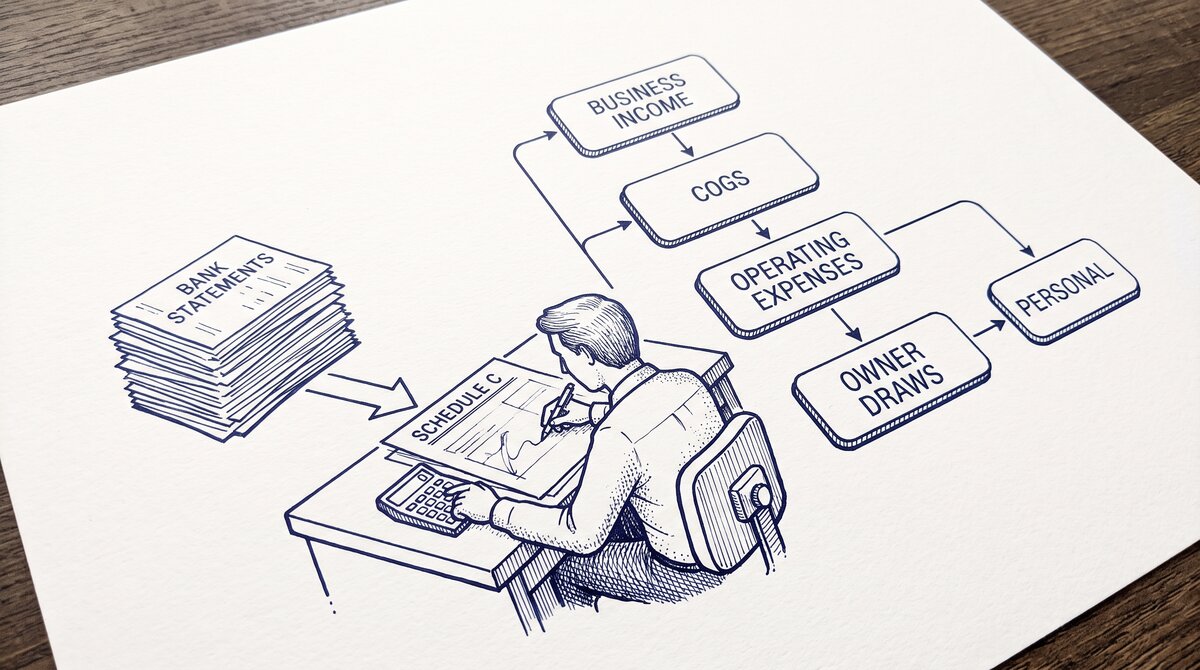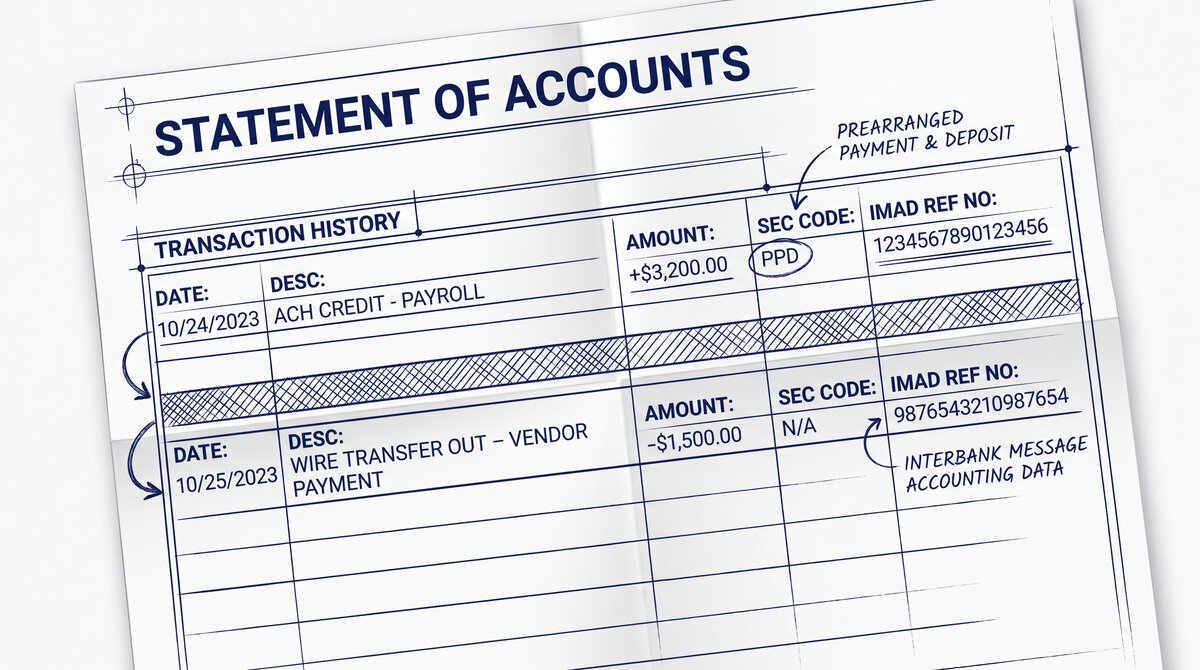

ACH appears on a bank statement as a batch debit or credit with a Standard Entry Class (SEC) code like PPD, CCD, or WEB. Wire appears as a single transaction with a 16-character IMAD/OMAD reference number. The fee pattern differs: ACH is often free on consumer statements, wire shows as a separate flat fee.
Reconciling both in QuickBooks or Xero requires matching the bank statement line to the originating transaction.
How ACH Transactions Appear on a Bank Statement
ACH transactions appear on a bank statement as a single line per batched credit or debit, even if the batch contained multiple underlying transactions. The line typically shows:
What most guides miss about this workflow is that the quality depends on the mechanism, not on the tool. Two tools that look different on the surface often run the same 4-step process underneath: read, find, parse, verify. The difference is in how well each step handles edge cases (merged cells, missing balances, non-standard date formats, scanned vs digital input).
Choosing between tools based on UI alone misses the actual quality lever.
- Date: the settlement date, not the origination date
- Description: the originating company name (e.g., “ACME PAYROLL”), sometimes followed by the SEC code (e.g., “PPD”)
- Amount: the net amount of the batch
- Balance: the running balance after the transaction
The SEC code (Standard Entry Class) identifies the ACH transaction type. The common codes:
- PPD (Prearranged Payment and Deposit): consumer payments like payroll, direct deposit, consumer bill pay
- CCD (Corporate Credit or Debit): business-to-business payments
- WEB (Web-initiated): online bill pay, e-commerce
- TEL (Telephone-initiated): phone banking
- POP (Point-of-Purchase): check conversion at retail
- ARC (Accounts Receivable): check conversion by biller
- BOC (Back Office Conversion): check conversion at back office
The SEC code appears in the description line of the bank statement, often after a separator like a hyphen or pipe. The code is critical for reconciliation because it tells the accounting software how to categorize the transaction.
How Wire Transfers Appear on a Bank Statement
Wire transfers appear on a bank statement as a single, large transaction with a 16-character reference number. The line typically shows:
- Date: the settlement date
- Description: the originating bank name, the beneficiary name, sometimes the purpose
- Reference: the IMAD (Input Message Accountability Data) or OMAD (Output Message Accountability Data) number, 16 characters
- Amount: the gross amount
- Fee: a separate line item, typically $15-$50 for domestic wires
The IMAD/OMAD number is the unique identifier for the wire. It is generated by the Federal Reserve for FedWire wires or by The Clearing House for CHIPS wires. The format is YYYYMMDDCCSSSSSS (year, month, day, century, sequence) for FedWire, or similar for CHIPS.
Wire transactions do not have a SEC code. The IMAD/OMAD is the equivalent identifier. Reconciling a wire requires the IMAD/OMAD to match the originating bank’s wire record.
Turn That PDF Into a Spreadsheet in Minutes
You've seen how to do it manually — now let the tool handle the heavy lifting. Upload your bank statement and get Excel, CSV, or QBO in a few clicks.
Try It FreeThe 4 Visual Differences
ACH and wire transactions differ on 4 specific dimensions on a bank statement.
1. Identifier Format
ACH: SEC code (3 letters) + originating company name. Wire: 16-character IMAD/OMAD reference number.
2. Fee Pattern
ACH: typically no separate fee line. The fee is absorbed by the originating bank or charged to the originating account, not the receiving account. Wire: separate fee line, typically $15-$50 for domestic wires, $40-$75 for international.
3. Batch vs Single
ACH: one line per batch. A payroll batch covering 50 employees appears as 1 line on the receiving employer’s bank statement (or 1 line per employee, depending on the ACH operator). Wire: always 1 line per transfer.
4. Settlement Date
ACH: settlement date is 1-3 business days after origination. Wire: settlement date is the same day. The 1-3 day gap between origination and settlement is invisible on a single statement but appears when reconciling against an internal record.
Reconciling ACH and Wire in QuickBooks and Xero
Reconciliation requires matching the bank statement line to the originating transaction. For ACH, the SEC code and originating company name are the matching keys. For wire, the IMAD/OMAD reference number is the matching key.
In QuickBooks:
- ACH batches: the bank feed imports each batch as a single transaction. The user matches it to the originating batch in the accounting system (e.g., the payroll run that produced the ACH batch).
- Wire: the bank feed imports the wire as a single transaction with the IMAD/OMAD in the memo. The user matches it to the originating invoice or bill.
In Xero:
- ACH batches: similar to QuickBooks, batched as single transactions, matched to the originating batch.
- Wire: single transactions, matched via the reference number.
The reconciliation challenge: ACH batches may contain multiple underlying transactions (e.g., 50 employees in a payroll batch). The user has to split the batch into individual transactions for accounting purposes, or record the batch as a single lump sum and reconcile at the batch level.
A common failure mode bookkeepers report is treating this as a single operation rather than a chain of dependent steps. The temptation is to find a tool that ‘just works’ and stop investigating the mechanism.
The result is a wrong-fix cycle: the tool gives partial output, the bookkeeper spends 30+ minutes troubleshooting, the fix is for the wrong step, and the same error recurs on the next statement. The fix: identify which step failed and apply the right intervention to that step.
When the Statement Hides the Difference
In some cases, the bank statement does not show whether a transaction was ACH or wire. This happens with:
- Aggregated accounts. Some banks aggregate multiple small transactions into a single line. The user cannot tell if a $500 credit was a single ACH or a wire.
- Mobile banking summaries. The mobile app may show only the net amount and the company name, without the SEC code or reference number.
- Older statements. Paper statements from 5+ years ago often lack the SEC code or reference number, making reconciliation impossible.
- International wires via intermediary. The recipient’s bank statement shows only the final amount and the last intermediary bank, not the original wire’s IMAD/OMAD.
When the difference is hidden, the user has to ask the bank for the full transaction record. Most banks can provide the detail (with a fee) for transactions up to 7 years old. The detail includes the SEC code or reference number, which enables proper reconciliation.
The pattern: ACH and wire are not interchangeable on a bank statement. The SEC code or IMAD/OMAD reference is the key to reconciliation. When the reference is missing, the user has to request the full record from the bank.
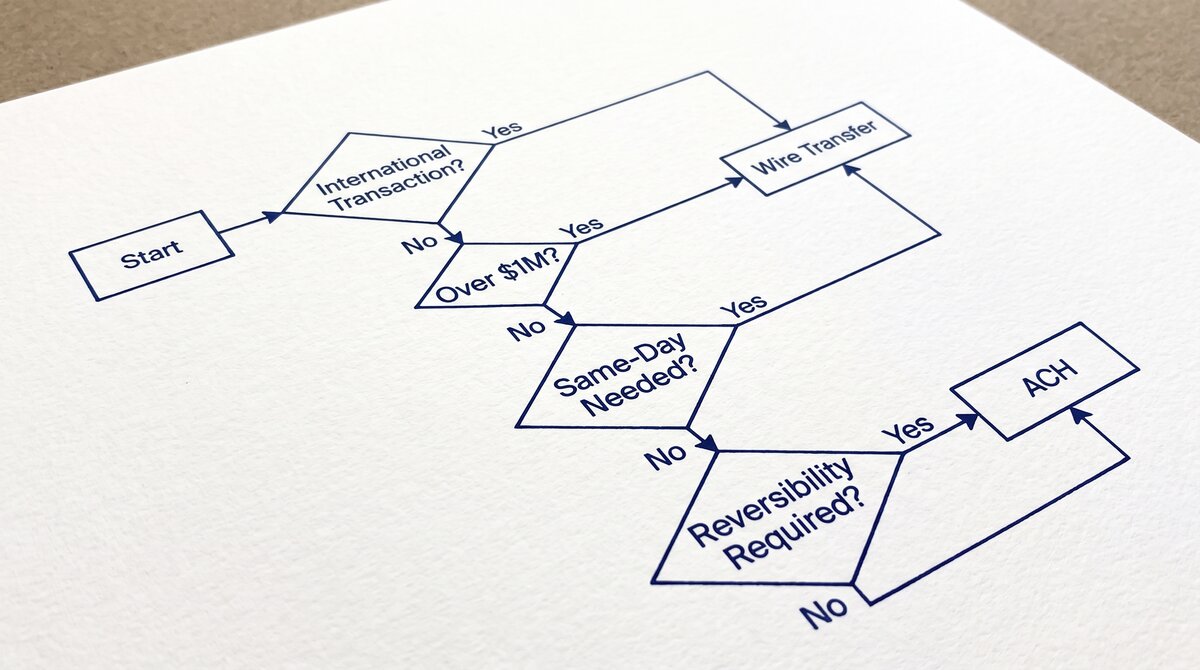
The ACH vs wire transfer pillar covers the 5-criteria decision matrix. The when to use wire vs ACH sub-pillar covers the decision tree. The cost comparison covers the fee layers. The speed comparison covers the cut-off times and ACH speed tiers.
For a deeper understanding, see: payment rails pillar . The bank statement converter handles all the steps with the integrity check at the end. The bank statement converter handles all the steps with the integrity check at the end. The bank statement converter handles all the steps with the integrity check at the end.
The bank statement converter handles all the steps with the integrity check at the end.
For the complete reference of every active ACH Standard Entry Class code, including when to use CCD vs PPD vs CTX vs WEB vs TEL vs RCK vs ARC vs BOC vs IAT, see ACH SEC Codes: the 9 standard entry class codes.
See also: ACH vs wire in context
This explainer is part of the payment rails coverage on this site. The consolidated overview of ACH, wire, Zelle, RTP, and FedNow for US banks now lives in the complete US bank payment rails guide, which is the modern hub for the topic.
For parallel reading on the merchant category codes that flow over the card-network rails, see the complete MCC guide. For what every column on a US bank statement means and where the rail labels appear, see the expanded bank statement anatomy.
Reading ACH and Wire on a US bank statement
ACH and wire transfers look like completely separate transaction types on a US bank statement, even when the dollar amount is identical. ACH carries a Standard Entry Class code (PPD, CCD, WEB, TEL, and 11 more), while wire carries a wire reference number that ties to the originating bank.
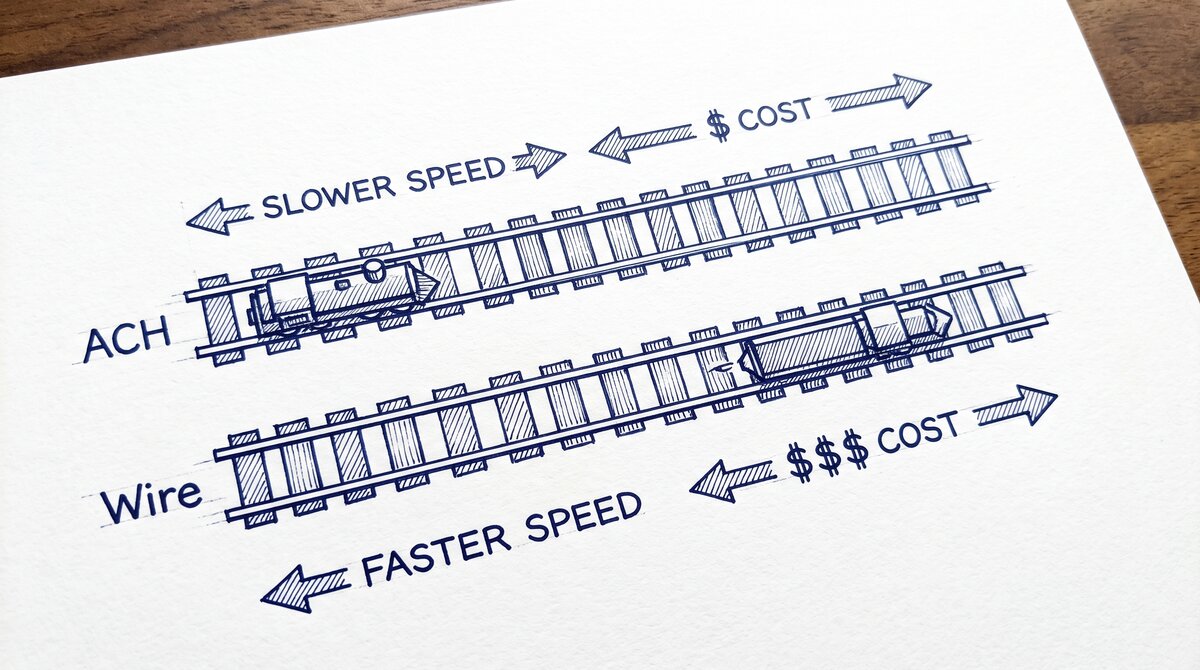
Speed is the easiest tell. ACH takes 1-2 business days for same-day ACH, 3-5 for standard ACH. Wire is same-day finality. So if you see a transfer posted the same business day it was sent, it was almost certainly a wire. If it posted 2-3 business days later, it was an ACH.
Cost is the second tell. ACH costs about $0.001-0.01 per entry. Wire costs $20-$50. Most banks waive the wire fee for transfers above a threshold (typically $5,000-$10,000) and most ACH fees if you carry a minimum balance.
For the full decision framework, see the parallel guides on speed, cost, and when to use a wire transfer vs ACH. The complete US bank payment rails guide covers ACH alongside wire, real-time, and card-network rails.
Two parallel rails, two parallel reading patterns
ACH and wire transfers share the same broad purpose (bank-to-bank transfer) but operate under different mechanics. Speed, cost, and reversibility are the three primary distinctions. Most consumers and small businesses never see a wire in their monthly statement because ACH handles all the routine flows.
When a wire does appear on a personal bank statement, it is usually an unusual event: real estate closing proceeds, an inheritance, a large gift, or a major capital movement. The line item on the statement will usually be labeled WIRE OUT or WIRE TRANSFER with the receiving bank’s name and a reference number.
On a small-business statement, both rails appear in the operating-account view. ACH dominates payroll and vendor flows. Wires appear when the business sends large one-off payments to real estate closing, contractors, or out-of-state suppliers. Easy Statement Sheet reads both rails in the four-column output.
Real-world reading patterns
When reconciling a US bank statement, ACH transfers show up as the dominant rail. They are nearly always labeled with the bank-of-origin, the SEC code, and an effective date that is one to two business days after the transaction sent date.
Wire transfers are rarer on a personal statement but routine on a small-business statement. They show up with a wire reference number, the receiving bank’s name, and the dollar amount. Reversal is impossible.
Some US bank statements show a third category beyond ACH and wire: real-time rails (RTP, FedNow). These are increasingly common as more banks adopt them. The label usually includes the rail name plus a reference number.
For the most reliable reading, work through the four-column conversion output. Date, Description, Amount, Balance. The rail label is visible in the Description column. Easy Statement Sheet reads the rail label into a separate column for spreadsheet-side filtering.
Reading the difference day to day
In normal bank operation, the difference between ACH and wire disappears for most consumers. Each line on a personal statement is automatically categorized as one or the other by the bank’s online banking view. The distinction only matters when the recipient asks which rail to use.
Small businesses sending ACH or wire weekly notice the time-of-day difference: ACH sent at 9 AM reaches by 4:30 PM, ACH sent at 3:30 PM reaches by next day. Wire behaves more deterministically: same-day before cutoff, next-day after cutoff.
Easy Statement Sheet reads ACH and wire transactions in the description column so that downstream reconciliation can split by rail. Once split, the categorization rules in QuickBooks Online or Xero can treat ACH as one category and wire as another for general-ledger reporting.
Output format: which one matches the destination?
Picking the right output format is a separate decision from picking the right converter.
XLSX for human spreadsheet review. CSV for downstream scripts and tools. Google Sheets-compatible for shared cloud review. QBO for QuickBooks.
The four canonical columns are preserved across every format. What differs is how the downstream consumer expects the rows.
For a side-by-side rule of thumb that maps destination to format, see the decision framework on the output format pillar.
Read the full output format decision framework
From Bank Statement to QuickBooks-Ready File
That manual cleanup you just read about? This tool skips it. Turn your PDF into QBO for QuickBooks without storing your data anywhere.
Start Converting