
Organize your bank statements for tax preparation in 3 to 5 hours by converting them to Excel first, then categorizing, then sending the categorized data to your CPA. The short answer: download 12 months of statements from every account, convert each PDF to Excel, add a category column to each transaction, generate a category summary, and send the workbook to your CPA. The 3-5 hour estimate is for a typical individual or freelancer with 2-3 bank accounts and 1-2 credit cards. Tax prep is the most common use case for bank statement conversion, and the workflow is repeatable year over year.
TL;DR. To organize bank statements for tax prep: (1) download 12 months of PDF statements from each bank account, (2) convert each PDF to Excel using a browser-based converter, (3) add a category column to each transaction, (4) generate a category summary tab, (5) send the workbook to your CPA. Total time: 3-5 hours for a typical individual. The IRS does not require you to submit bank statements with your return, but you must keep them for 3-7 years in case of audit. The 11 standard categories (advertising, office expense, contract labor, etc.) cover 90% of business expenses for the self-employed.
Why Bank Statements Matter for Tax Prep
The IRS does not require you to submit bank statements with your tax return. But the IRS does require you to keep documentation that supports every item of income, deduction, and credit on your return. If audited, bank statements are the most commonly requested record type. For most filers, the right time to organize is January, the month after the tax year ends. The organization pays off during the actual filing and during any future audit.
The 3 reasons to organize bank statements for tax prep:
- Faster filing: A categorized workbook lets your CPA import directly into tax software instead of manually transcribing 200-500 transactions from PDFs. The CPA’s time saved: 2-5 hours. Your cost: typically $300-$750 less in CPA fees.
- Audit defense: If the IRS audits a return 2-3 years later, you need the statements to verify the deductions. Without organized records, you have to contact each bank and pay $5-25 per statement to retrieve them. With organized records, the audit response takes 1-2 days instead of 2-4 weeks.
- Better decisions: The categorization reveals spending patterns. Many people find $1,000-$5,000/year in deductible expenses they were missing (home office, mileage, professional development, subscriptions).
The 5-Step Organization Workflow
The 5 steps take 3-5 hours total for a typical individual. The work is concentrated in steps 2 and 3.
Step 1: Download 12 Months of Statements (30-60 minutes). Log into each bank account, navigate to Statements or Documents, and download 12 months of PDFs. This includes checking, savings, business, and credit card accounts. Most banks allow 18-24 months of online access. For older periods, you need to contact the bank directly. Save the PDFs to a folder named “2025 Tax Year” with subfolders per account.
Step 2: Convert Each PDF to Excel (30-60 minutes). Use a browser-based converter to extract the transaction table from each PDF. The output is a clean Excel file with date, description, amount, balance. A typical statement converts in 2-5 minutes. For 5 accounts × 12 months = 60 statements, the conversion takes 2-5 hours. For most individuals with 2-3 accounts, it’s 30-60 minutes total.
The bank statement converter handles the conversion in 2-5 minutes per statement with no upload to a server, which is the safest option for tax-relevant financial data.
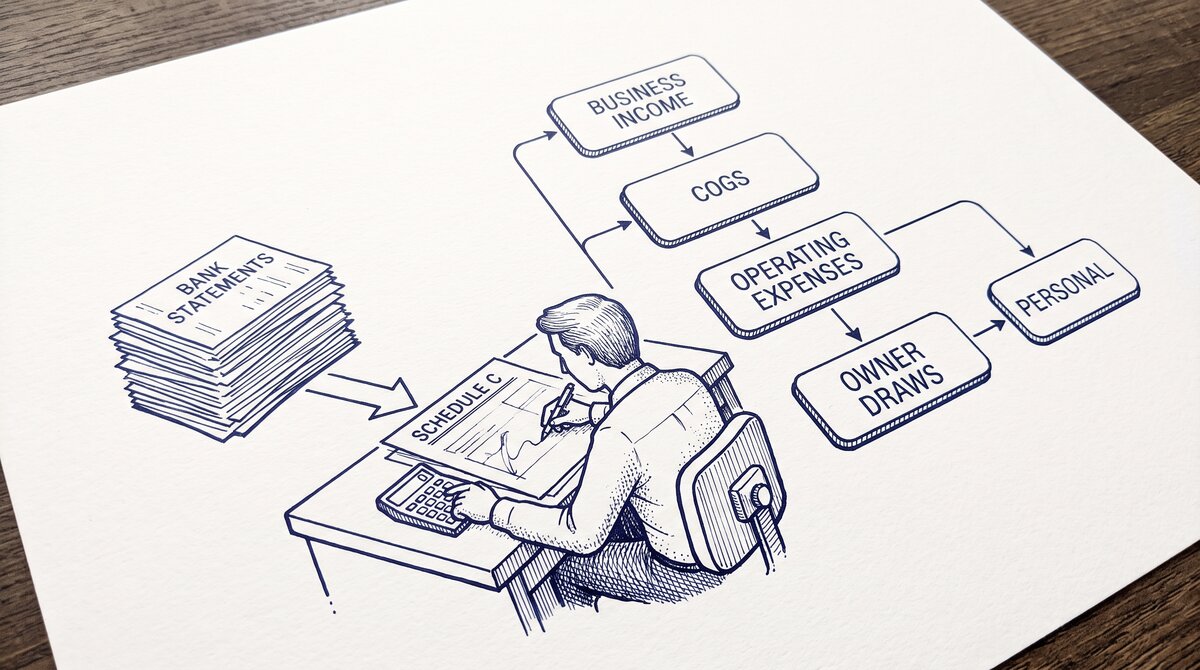
Step 3: Add a Category Column (60-120 minutes). Open the converted Excel file, add a new column called “Category” or “Tax Category”, and tag each transaction with one of 11 standard categories. The 11 categories are: Income, Cost of Goods Sold, Advertising, Office Expense, Contract Labor, Professional Services, Travel, Meals, Vehicle Expense, Bank Fees, Other. For personal returns, use a simpler 5-category system: Income, Deductible Expense, Personal Expense, Transfer, Investment.
For the full 11-category framework, see the bank transaction categorization reference. For tax-specific categories (Schedule C, Schedule E, etc.), your CPA can provide the exact list.
Step 4: Generate a Category Summary (15-30 minutes). In a new tab, use SUMIF or a pivot table to total each category. The summary tab becomes the basis for the actual tax return. For business filers, the summary maps directly to the Schedule C lines. For personal filers, the summary identifies itemized deductions (charitable, medical, mortgage interest).
Step 5: Send the Workbook to Your CPA (10 minutes). Email the categorized workbook to your CPA. If your CPA uses cloud accounting software (QuickBooks, Xero, Wave), the workbook can be imported directly. If your CPA uses desktop software, the workbook is read directly. The CPA’s time to process: 2-5 hours vs 5-10 hours for raw PDF statements.
From Bank Statement to QuickBooks-Ready File
That manual cleanup you just read about? This tool skips it. Turn your PDF into QBO for QuickBooks without storing your data anywhere.
Start ConvertingThe IRS Retention Rules
The IRS retention rules depend on the type of return and the taxpayer’s situation:
- General filing (3 years): The standard statute of limitations. The IRS has 3 years from the date you filed to assess additional tax.
- Underreported income (6 years): If you underreported income by more than 25%, the IRS has 6 years to assess. This is the most common extended period.
- Worthless securities or bad debt (7 years): A special rule for these specific deduction types. The 7-year clock starts from the date the security became worthless or the bad debt became deductible.
- Unfiled or fraudulent return (no limit): The IRS can assess tax at any time, indefinitely. Records must be kept forever.
The safe practice: keep tax records for 7 years. The cost is minimal (cloud storage is $0.02/GB/month). The risk of not having records when needed: 20-40% of the deductions claimed may be disallowed in an audit, plus accuracy-related penalties of 20-75% of the underpayment.
5 Common Mistakes in Tax Prep Organization

5 mistakes that cost filers the most time and money:
1. Mixing personal and business in one account. When the freelancer uses the business account for personal purchases, those purchases should be tagged as “Owner Draw” not as business expenses. Misclassifying them as business expenses inflates the deductions and triggers IRS adjustments. The fix: keep personal and business in separate accounts, with a clear transfer pattern between them.
2. Not documenting large deposits. A deposit of $10,000 or more triggers a Currency Transaction Report (CTR) at the bank. The IRS has access to CTRs. If you have a large deposit and no documented source, the IRS may ask. The fix: for any deposit over $5,000, document the source (loan, transfer, sale) in a notes column.
3. Forgetting to include all accounts. The IRS has access to all your bank accounts through third-party reporting (Form 1099, Form 1099-K, Form 1098). If you have an account you didn’t include in your tax return, the IRS may detect it. The fix: include every account, even those with no transactions during the year.
4. Missing deductible expenses. Many deductions go unclaimed because the taxpayer didn’t categorize them. Common missed categories: home office ($5-20 per square foot), mileage ($0.67/mile for 2024), professional development, subscriptions, and equipment. The fix: use a comprehensive 11-category system, not a 3-4 category shortcut.
5. Waiting until April to organize. Organizing 12 months of statements in March is stressful and error-prone. Organizing in January is calm and thorough. The fix: schedule 4-6 hours in mid-January every year. Make it a habit, like changing the batteries in your smoke detector.
Tools for the Workflow
3 tools that make the workflow faster:
- Browser-based converter: The bank statement converter handles PDFs in 2-5 minutes with no upload. Faster than desktop tools, more secure than cloud tools.
- Spreadsheet with category column: Excel or Google Sheets, with a 11-category dropdown list. Use data validation to prevent typos.
- Cloud storage for records: Google Drive, Dropbox, or OneDrive. 7 years of statements takes approximately 200-500 MB. The cost: $0.10/month.
For the underlying transaction categorization, see the bank transaction categorization reference. For converting statements from a specific bank, see the convert to QuickBooks guide. For combining multiple months into one file, see the combine multiple bank statements guide.
For more on this, see the bank statement audit response page.
Turn any PDF statement into a clean sheet
Skip the typos and the hours of copying. Our converter handles any bank statement format and outputs Excel, CSV, or QBO for QuickBooks. No file retention, free to try.
Convert your statement