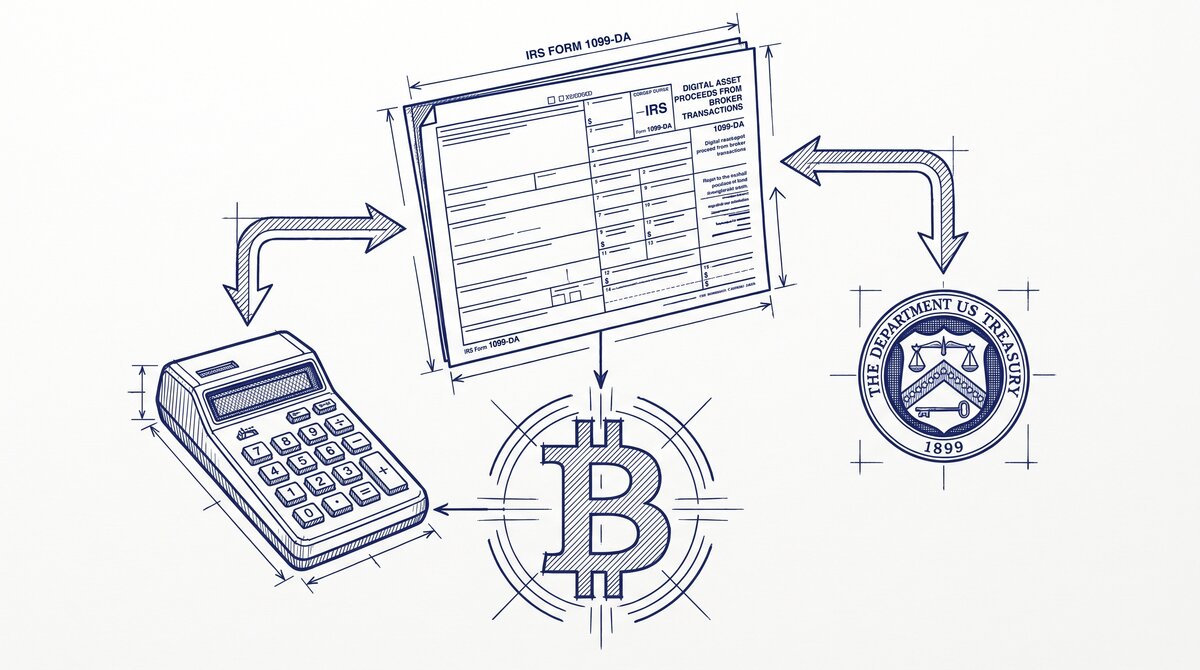

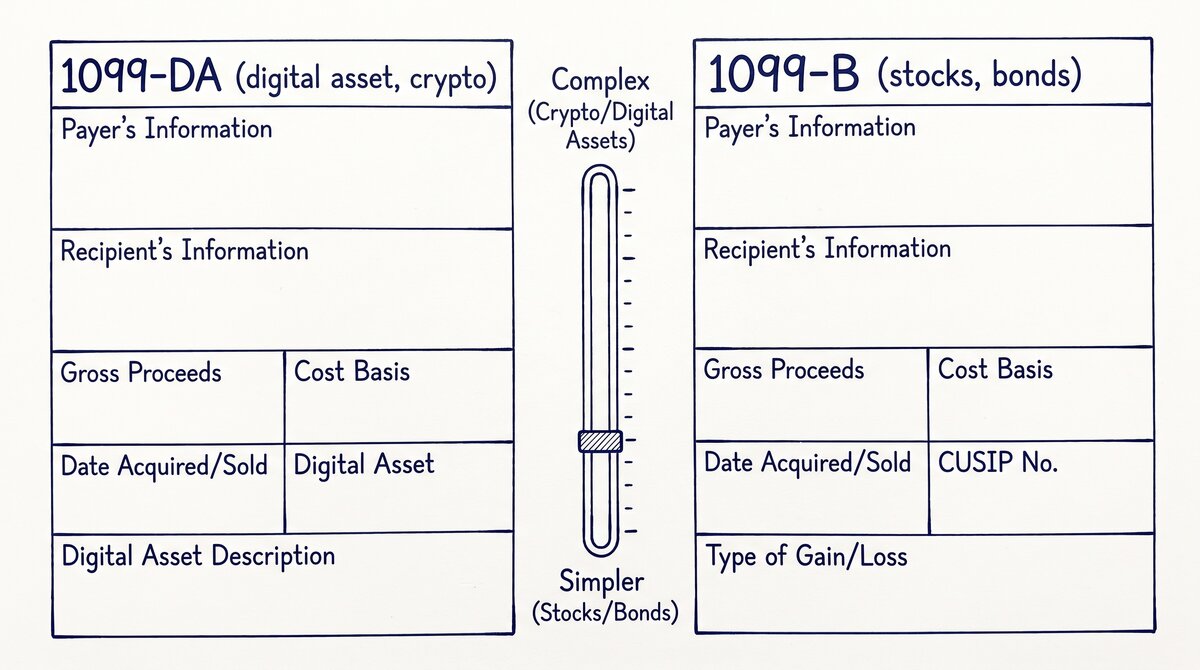
1099-DA is the IRS’s new broker reporting form for digital asset transactions. Crypto brokers issue it starting in 2025 for transactions during 2024, and it reports gross proceeds (Box A) and cost basis (Box B) for sales, exchanges, and certain transfers of digital assets.
It is the bridge from broker records to IRS Form 8949, and the missing piece that makes crypto tax enforcement actually work for the first time.
What IRS Form 1099-DA Is and Why It Exists
The IRS has long required brokers to report customer transactions. For securities (stocks, bonds, options, futures), the form is 1099-B. For interest, 1099-INT. For miscellaneous income, 1099-MISC. For digital assets, there was no equivalent form until 1099-DA.
Why It Exists
Before 2025, crypto transactions were reported to the IRS only when:
- The user sold crypto for fiat currency (reported as capital gain on Form 8949, but not flagged by the IRS)
- The user received staking rewards (reported as ordinary income, but not flagged)
- The user was selected for audit (manual reconstruction from exchange records)
This created a tax compliance gap. The IRS estimated $50 billion in unpaid crypto taxes from 2014-2024. The 1099-DA form closes that gap by requiring brokers to report directly to the IRS, just as stock brokers report via 1099-B.
The Legislative History
The 1099-DA requirement was part of the Infrastructure Investment and Jobs Act (2021), with the reporting rules finalized in Treasury Regulation 1.6045-1 in 2024. The phased rollout gives brokers time to build the necessary tracking:
- 2025 transactions: brokers report gross proceeds only (Box A)
- 2026 transactions: brokers report gross proceeds and cost basis (Box A and Box B)
- 2027 transactions and later: full cost basis tracking required for all covered transactions
The User’s Role
The user does not file 1099-DA. The broker files it. The user receives a copy, transfers the data to Form 8949 (Sales and Other Dispositions of Capital Assets), and files it with their tax return. The IRS receives the same 1099-DA from the broker and matches it against the user’s Form 8949.
The Form’s Anatomy: 4 Boxes That Matter
1099-DA is a single-page form with 4 boxes that matter for most users.
Box A: Gross Proceeds
The total amount received from the sale or exchange of digital assets. For a sale of 1 BTC at $50,000, Box A shows $50,000. For a swap (BTC to ETH), Box A shows the fair market value of the ETH received.
Box B: Cost Basis
The user’s purchase price for the digital asset sold. For the BTC sold at $50,000 that was originally purchased at $30,000, Box B shows $30,000. The difference ($20,000) is the realized capital gain.
Box B is optional in 2025 (gross proceeds only) and required in 2026+. Brokers that cannot reliably track cost basis report Box B as “unknown” and the user has to reconstruct it from their own records.
Box C: Transaction Type
Indicates whether the transaction is a sale, exchange, transfer, or other covered event. Common codes include:
- S: Sale (crypto for fiat)
- E: Exchange (crypto for crypto)
- T: Transfer (wallet-to-wallet, not a taxable event but reported)
- O: Other (e.g., staking reward, airdrop, hard fork)
Box D: Wallet Address
The wallet address involved in the transaction. Required for transfers and certain exchanges, optional for sales. The IRS uses this to track crypto movements across wallets and identify unreported transactions.
From PDF to Excel in one click
Forget retyping line by line. Upload any bank statement, get a spreadsheet you can actually use. Your files are never stored, and you can test the converter with 3 free conversions.
Try it freeWhen Brokers Must Issue 1099-DA
The IRS definition of “broker” for 1099-DA purposes is broader than for 1099-B.
Who Is a Broker
- Crypto exchanges (Coinbase, Kraken, Gemini, etc.): clearly brokers
- Crypto payment processors (BitPay, Coinbase Commerce): brokers for the merchant side
- Custodial wallet providers (some wallet services that hold user funds): brokers
- Crypto ATMs in some cases: brokers for the operator
Who Is Not a Broker
- Non-custodial wallet providers (most software wallets): not brokers, because they do not hold user funds
- Decentralized exchanges (Uniswap, etc.): not brokers in the traditional sense, but the IRS is working on guidance
- DeFi protocols (lending, staking pools): not yet classified; the IRS has indicated that protocol-level reporting is coming
Reporting Thresholds
There is no minimum transaction threshold for 1099-DA. Every sale, exchange, or covered transfer is reported, regardless of amount. This is different from 1099-MISC, which has a $600 threshold.
For 2025, the reporting covers sales and exchanges. For 2026+, it expands to include certain transfers and additional transaction types. The phased rollout reflects broker tracking capability, not user-side thresholds.
What 1099-DA Reports vs What It Does Not
1099-DA covers the broker side of digital asset transactions. It does not cover everything.
What 1099-DA Reports
- Sales of digital assets for fiat currency (e.g., selling BTC for USD)
- Exchanges of one digital asset for another (e.g., BTC to ETH)
- Certain transfers between wallets (reported but not necessarily taxable)
- Staking rewards reported as ordinary income (if the broker is also the staking provider)
What 1099-DA Does Not Report
- Transactions on non-US exchanges (the broker is not subject to US reporting)
- Transactions on decentralized exchanges (no broker to report)
- DeFi protocol transactions (lending, borrowing, liquidity provision)
- Lost or stolen digital assets (no broker involved)
- Gifts of digital assets (the gift is reported by the recipient only if sold)
For transactions not covered by 1099-DA, the user self-reports on Form 8949. The IRS matches 1099-DA against Form 8949; mismatches are audit triggers.
How 1099-DA Connects to Your Bank Statement
The bank statement is the verification layer for 1099-DA. The 1099-DA reports what the broker did; the bank statement shows what cash actually moved.
The Verification Pattern
For a sale of BTC for USD, the 1099-DA shows gross proceeds and cost basis. The bank statement shows a corresponding deposit (from the exchange to the user’s bank account) within a few days. The amounts should match within a small margin for fees and exchange rate fluctuations.
For a transfer between wallets (BTC from one wallet to another), the 1099-DA may report the transfer. The bank statement shows nothing (no cash moved). The 1099-DA Box C (transaction type) indicates “T” for transfer, and Box B (cost basis) is the same as Box A (no gain or loss).
For staking rewards, the 1099-DA reports the reward as ordinary income at fair market value on the day received. The bank statement shows nothing at the time of the reward (the crypto is in the user’s wallet, not the bank). The bank statement shows cash only when the user sells the reward for fiat.
The Reconciliation Workflow
The user receives 1099-DA from each broker by January 31. The user opens each bank statement for the year. For each 1099-DA entry, the user finds the corresponding bank statement line (if cash was involved) and confirms the amount matches. Mismatches over a 10% threshold are flagged for review; mismatches over 25% are likely audit triggers.
The 5 Common Mistakes Taxpayers Make with 1099-DA
Mistake 1: Treating All 1099-DA Income as Long-Term Capital Gain
Not all 1099-DA income is long-term. Sales of assets held less than 1 year are short-term (taxed as ordinary income). Staking rewards are ordinary income at receipt, not capital gain at sale. The user has to classify each transaction correctly.
Mistake 2: Ignoring Transfers
Transfers between wallets are reported on 1099-DA but are not taxable events. Many users report them as sales on Form 8949, generating a phantom gain or loss. The IRS has automated matching that flags phantom transactions.
Mistake 3: Not Reconciling with the Bank Statement
The 1099-DA reports what the broker did. The bank statement shows what cash actually moved. A user who reports the 1099-DA amounts without checking the bank statement may report transactions that did not actually settle (e.g., a sale that the broker cancelled).
Mistake 4: Forgetting Non-US Brokers
1099-DA only covers US-issuable brokers. Transactions on Binance, Kraken International, or other non-US exchanges are not reported on 1099-DA. The user has to self-report these on Form 8949. Failing to do so is a common audit trigger.
Mistake 5: Ignoring Staking and Airdrops
Staking rewards and airdrops are taxable as ordinary income at fair market value on the day received. Many users treat them as non-taxable until sold, which understates income in the year of receipt. The IRS matches 1099-DA entries against reported income; missing entries are flagged.
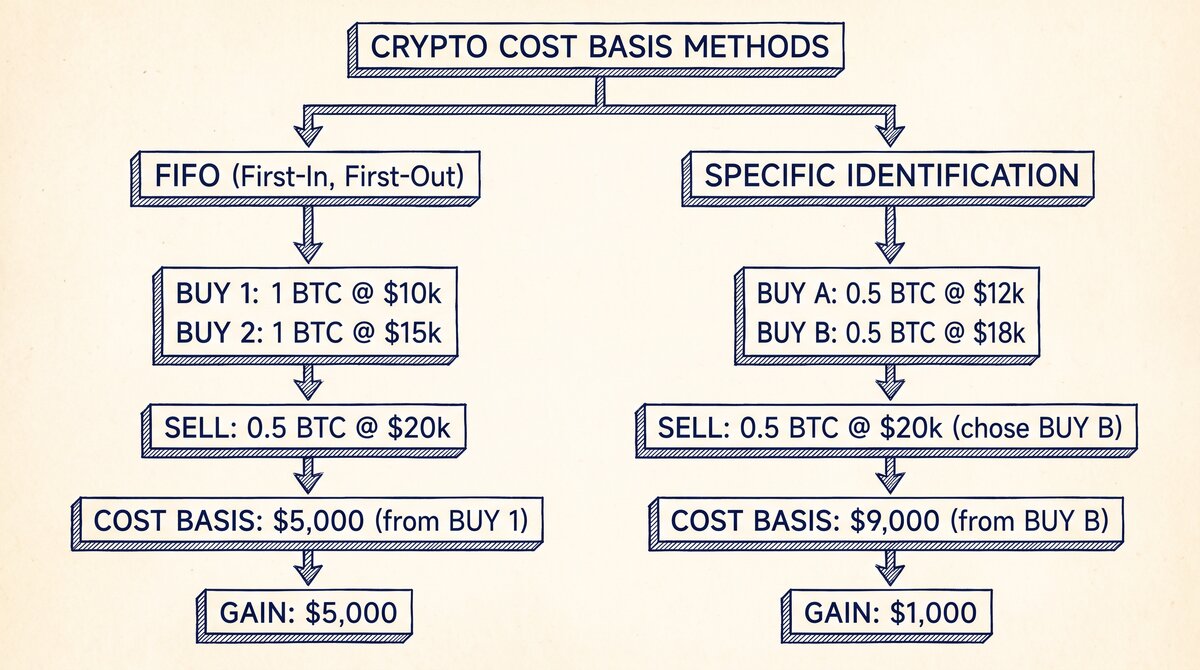
The 1099-DA vs 1099-B sub-pillar covers the 6 differences between the two forms. The cost basis methods spoke covers FIFO and Spec ID. The bank statement reconciliation spoke covers the verification workflow. The broker reporting requirements spoke covers who counts as a broker and the phased rollout.
For a deeper understanding, see: 1099-DA pillar . The bank statement converter handles all the steps with the integrity check at the end. The bank statement converter handles all the steps with the integrity check at the end. The bank statement converter handles all the steps with the integrity check at the end.
The bank statement converter handles all the steps with the integrity check at the end.
Related: complete 1099-DA crypto tax guide
This topic is part of the broader 1099-DA and crypto-tax cluster on this site. The consolidated hub for the entire topic, including the form mechanics, broker requirements, cost basis methods, reconciling to bank statements, and state-level differences, now lives in the complete 1099-DA crypto tax reporting guide.
For related reading, the complete US bank payment rails guide covers ACH and wire cash flows from crypto exchanges, and the complete MCC guide covers merchant category codes on credit-card statements. The expanded bank statement anatomy pairs naturally with this hub.
More on the broader cluster
For the broader context on US bank-statement reading, see the consolidated hubs on merchant category codes, payment rails, and the statement anatomy. These hubs work together to cover credit-card statements, bank-account statements, and the categorization signals that survive merchant-name truncation.
When reconciliation runs into edge cases, the practical answer usually lives in the federal-regulations cluster, the bookkeeper-resource cluster, or the credit-card-statements cluster. Each offers a domain-specific take on the same underlying signal.
Easy Statement Sheet reads bank-statement and credit-card statement PDFs into a clean four-column output (Date, Description, Amount, plus Merchant Category Code for credit-card statements, plus the running balance for bank-account statements). Files are never stored.
The first three statement conversions are free, no card required. Plans start at $15 per month. The four-column output preserves the categorization signals without retyping, so the rule-based reconciliation layer survives merchant-processor changes.
Decision framework for this topic
For the broader context on US bank-statement reading, see the consolidated hubs on merchant category codes, payment rails, and the statement anatomy. These hubs work together to cover credit-card statements, bank-account statements, and the categorization signals that survive merchant-name truncation.
Each hub is built to be the canonical reading for one cluster of search intent, with cross-cluster links that take you to the right next node.
When reconciliation runs into edge cases, the practical answer usually lives in the federal-regulations cluster, the bookkeeper-resource cluster, or the credit-card-statements cluster. Each offers a domain-specific take on the same underlying signal. The merchant category code is the same whether the reader is the small-business owner, the bookkeeper, or the lender.
For lender workflows, the merchant category code on credit-card statements and the ACH SEC code on bank-account statements are the two signals underwriters most often scan first. Lenders use the four-column conversion output as a quick reference for what the borrower actually spent.
Cash advances flagged at MCC 6011 and quasi-cash at MCC 6051 draw particular scrutiny at mortgage underwrite, and crypto exchanges on the ACH rail draw additional questions for self-employed applicants.
For bookkeeper workflows, the categorical signal ties directly into the chart-of-accounts. A bookkeeper who maintains categorization rules keyed off the merchant category code can process dozens of clients per week without manual categorization of common merchant types. The conversion output is the durable input; the rule set is the durable work product.
Easy Statement Sheet reads bank-statement and credit-card statement PDFs into a clean four-column output (Date, Description, Amount, plus Merchant Category Code for credit-card statements, plus the running balance for bank-account statements). Files are never stored. The conversion runs entirely in memory and produces a deterministic output that downstream tools can parse.
The first three statement conversions are free, no card required. Plans start at $15 per month. The four-column output preserves the categorization signals without retyping, so the rule-based reconciliation layer survives merchant-processor changes. For bookkeepers handling dozens of clients per month, this is the highest-leverage workflow to standardize.
Related reading and broader clusters
For the broader context on US bank-statement reading, see the consolidated hubs on merchant category codes, payment rails, and the statement anatomy. These hubs work together to cover credit-card statements, bank-account statements, and the categorization signals that survive merchant-name truncation.
Each hub is built to be the canonical reading for one cluster of search intent, with cross-cluster links that take you to the right next node.
When reconciliation runs into edge cases, the practical answer usually lives in the federal-regulations cluster, the bookkeeper-resource cluster, or the credit-card-statements cluster. Each offers a domain-specific take on the same underlying signal. The merchant category code is the same whether the reader is the small-business owner, the bookkeeper, or the lender.
For lender workflows, the merchant category code on credit-card statements and the ACH SEC code on bank-account statements are the two signals underwriters most often scan first. Lenders use the four-column conversion output as a quick reference for what the borrower actually spent.
Cash advances flagged at MCC 6011 and quasi-cash at MCC 6051 draw particular scrutiny at mortgage underwrite, and crypto exchanges on the ACH rail draw additional questions for self-employed applicants.
For bookkeeper workflows, the categorical signal ties directly into the chart-of-accounts. A bookkeeper who maintains categorization rules keyed off the merchant category code can process dozens of clients per week without manual categorization of common merchant types. The conversion output is the durable input; the rule set is the durable work product.
Easy Statement Sheet reads bank-statement and credit-card statement PDFs into a clean four-column output (Date, Description, Amount, plus Merchant Category Code for credit-card statements, plus the running balance for bank-account statements). Files are never stored. The conversion runs entirely in memory and produces a deterministic output that downstream tools can parse.
The first three statement conversions are free, no card required. Plans start at $15 per month. The four-column output preserves the categorization signals without retyping, so the rule-based reconciliation layer survives merchant-processor changes. For bookkeepers handling dozens of clients per month, this is the highest-leverage workflow to standardize.
Turn PDF Bank Statements Into Workable Spreadsheets
Your bank statement is a mess of numbers, but your books shouldn't be. Use our converter to get Excel, CSV, or QBO files — ready for QuickBooks.
Try It Free Now