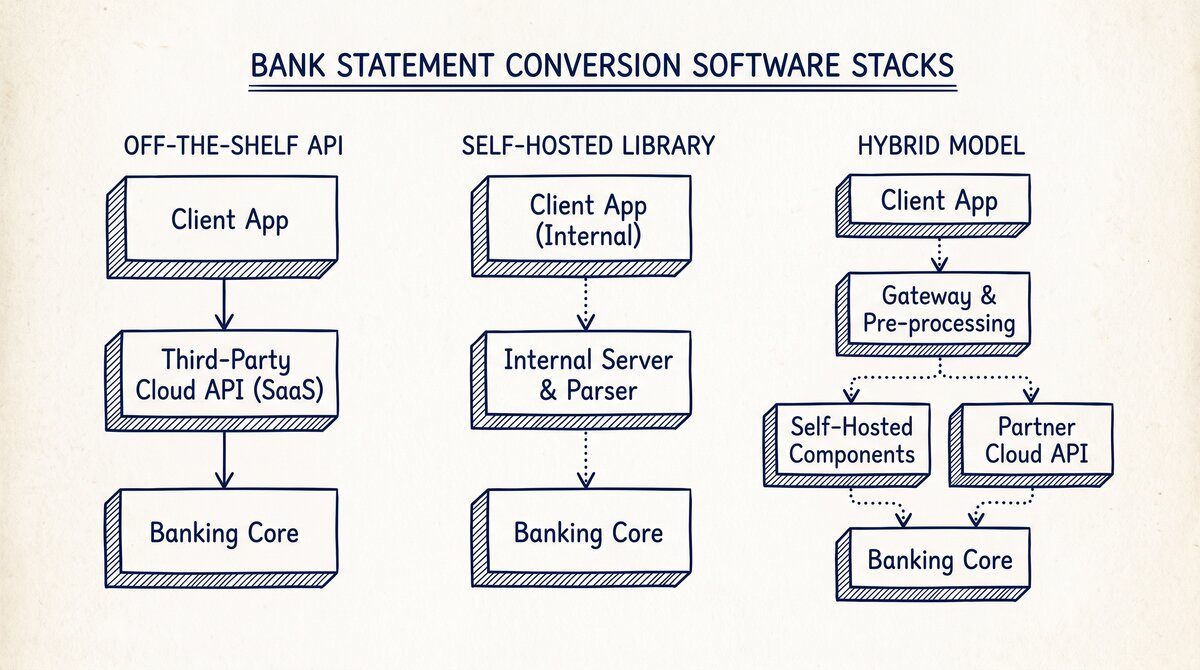

For software products handling 100+ bank statements per month, a conversion API is 100x cheaper and faster than the manual path. The 3 API approaches: off-the-shelf API (AWS Textract, Google Document AI, Mindee), self-hosted library (pdfplumber, PyPDF2, pytesseract), or hybrid (local first, then API for difficult cases). The right choice depends on volume, accuracy requirement, and privacy constraints.
TL;DR. For software handling 100+ bank statements/month, use a conversion API. The 3 approaches: (1) Off-the-shelf API ($0.05-$0.50/page, 2-10 sec latency, no setup), (2) Self-hosted library (free + infra, 1-3 sec latency, requires engineering), (3) Hybrid (best accuracy, higher cost, more code). The 5 evaluation criteria: accuracy, latency, cost, privacy, vendor lock. The build-vs-buy decision: under 1,000 pages/month, off-the-shelf API wins; over 10,000 pages/month, self-hosted or hybrid wins on cost.
The 3 API Approaches for Bank Statement Conversion
There are 3 ways to integrate bank statement conversion into a software product. Each has different tradeoffs on cost, latency, accuracy, and privacy.
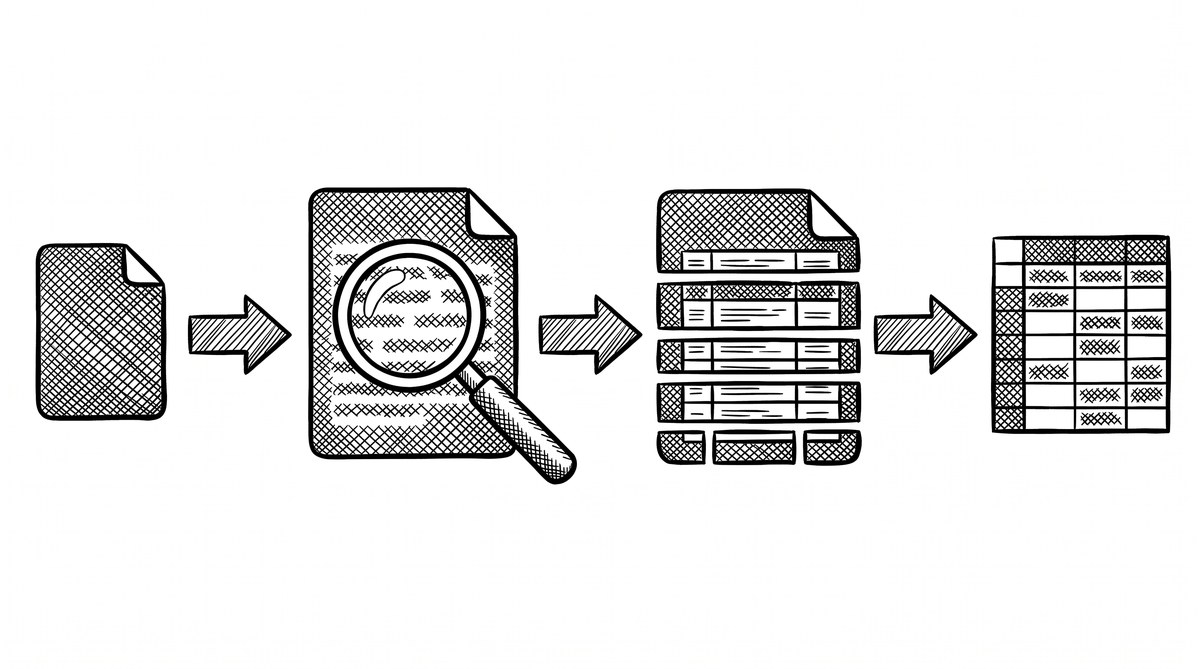
What most guides miss about this workflow is that the quality depends on the mechanism, not on the tool. Two tools that look different on the surface often run the same 4-step process underneath: read, find, parse, verify. The difference is in how well each step handles edge cases (merged cells, missing balances, non-standard date formats, scanned vs digital input). Choosing between tools based on UI alone misses the actual quality lever.
Approach 1: Off-the-Shelf API
Send the PDF to a third-party API; receive the structured data back. The API handles OCR, table detection, and field extraction. The integration is a single API call.
Common providers:
- AWS Textract: Amazon’s document analysis API. Strong on forms and tables. Pricing: $0.05 per page for tables, $0.07 per page for forms.
- Google Document AI: Google’s document processing API. Strong on handwriting and complex layouts. Pricing: $0.10 per page for the form parser.
- Mindee: A document AI API focused on financial documents. Has a bank statement-specific model. Pricing: $0.10-0.50 per page depending on volume.
- Veryfi: A receipt and document API. Strong on receipts, weaker on bank statements. Pricing: $0.10 per page.
- Affinda: A document AI API. Bank statement-specific model. Pricing: $0.20-0.30 per page.
The advantage: zero setup, fast to integrate, high accuracy on common layouts. The disadvantage: per-page cost, data leaves your infrastructure, vendor lock risk.
Approach 2: Self-Hosted Library
Run the conversion on your own infrastructure using open-source libraries. The libraries handle OCR, table detection, and field extraction.
Common libraries:
- pdfplumber (Python): PDF parsing and table extraction. No OCR (requires digital PDF).
- PyPDF2 / pypdf (Python): Basic PDF text extraction. No OCR.
- pytesseract (Python wrapper for Tesseract): OCR. Requires image input (PDF must be converted to image first).
- Camelot (Python): Table extraction from PDFs. Best for digital PDFs with clear table structure.
- Tabula (Java/Python): Table extraction. Best for digital PDFs.
- pdf2image + pytesseract: The combined approach for scanned PDFs.
The advantage: zero per-page cost, full data control, no vendor lock. The disadvantage: requires engineering to set up and maintain, accuracy is lower than purpose-built APIs, scaling requires infra planning.
Approach 3: Hybrid
Use the self-hosted library as the first pass, fall back to the off-the-shelf API for cases the library cannot handle (scanned PDFs, complex layouts, low accuracy).
The hybrid is more complex to implement but gives the best accuracy at moderate cost. A typical implementation:
- Try the self-hosted library first
- Check the result for confidence (e.g., balance check, row count vs header count)
- If confidence is low, retry with the off-the-shelf API
- Cache the result to avoid re-processing
The advantage: best accuracy, cost optimization (API only for hard cases). The disadvantage: more code, more complex failure modes, harder to debug.
The 4 Cost Models
The 4 ways to pay for conversion capacity:
Cost Model 1: Per-Page
Pay for each page processed. Pricing: $0.05-$0.50 per page depending on the API and volume. Best for low-volume, variable usage. Common for off-the-shelf APIs.
For 1,000 pages/month at $0.10/page: $100/month.
For 10,000 pages/month at $0.10/page: $1,000/month.
Cost Model 2: Per-Document
Pay for each document (which may have multiple pages) processed. Pricing: $0.50-$5.00 per document. Best for higher-volume, predictable usage.
For 1,000 documents/month at $1.00/document: $1,000/month.
Cost Model 3: Subscription
Pay a flat monthly fee for a quota of conversions. Pricing: $100-$5,000/month depending on the vendor and quota. Best for high-volume, predictable usage.
For 10,000 documents/month at $2,000/month subscription: $0.20/document.
Cost Model 4: Self-Hosted
Pay for the infrastructure to run the libraries. Pricing: $50-$500/month for cloud compute (depending on size), plus engineering time for setup and maintenance. Best for very high volume or strict privacy requirements.
For 100,000 pages/month on a $200/month server: $0.002/page.


Turn any PDF statement into a clean sheet
Skip the typos and the hours of copying. Our converter handles any bank statement format and outputs Excel, CSV, or QBO for QuickBooks. No file retention, free to try.
Convert your statementThe 4 Integration Patterns
The 4 ways to integrate conversion into a software product:
Pattern 1: Synchronous API Call
The user uploads the PDF; the API processes it immediately; the result is returned in the same request. Latency: 2-10 seconds per page. Best for low-latency use cases (user is waiting).
Pattern 2: Asynchronous API Call
The user uploads the PDF; the API returns a job ID; the user polls for completion or receives a webhook. Latency: 10-60 seconds total. Best for batch processing, large documents, or when the user can wait.
Pattern 3: Webhook Callback
The user uploads the PDF; the API processes it; the API calls a webhook URL on the user’s server when complete. Latency: 10-60 seconds, but the user does not poll. Best for production systems with server-to-server integration.
Pattern 4: Batch Processing
The user uploads multiple PDFs; the API processes them in a batch; the user gets a job ID and polls for completion. Latency: minutes to hours depending on batch size. Best for bulk imports, historical archives, or nightly processing.
The 5 Evaluation Criteria
The 5 criteria to evaluate when choosing a conversion API:
1. Accuracy
The percentage of transactions correctly extracted. For bank statements, the target is 99%+ for digital PDFs and 95%+ for scanned PDFs. Lower accuracy means more manual cleanup.
Off-the-shelf APIs typically achieve 95-99% accuracy. Self-hosted libraries achieve 85-95% depending on the PDF quality. Hybrid approaches can reach 99%+.
2. Latency
The time from upload to result. For synchronous calls, this is the user-visible latency. For async or webhook patterns, this is the total processing time.
Off-the-shelf APIs typically have 2-10 second latency for synchronous calls. Self-hosted libraries have 1-3 second latency on a single document (multi-document processing is faster per document).
3. Cost
The per-page or per-document cost. Off-the-shelf APIs are $0.05-$0.50 per page. Self-hosted libraries have variable cost based on infra spend.
4. Privacy
Whether the data leaves your infrastructure. Off-the-shelf APIs send the PDF to the vendor’s servers. Self-hosted libraries keep the data on your infrastructure. The hybrid sends low-confidence cases to the vendor.
For bank statements, privacy is high-stakes. The bank statement privacy and security article covers the 5 questions to ask before uploading.
5. Vendor Lock
The cost of switching vendors. Off-the-shelf APIs have a custom integration per vendor; switching requires code changes. Self-hosted libraries are interchangeable (pdfplumber, PyPDF2, etc.) and switching is trivial.
A common failure mode bookkeepers report is treating this as a single operation rather than a chain of dependent steps. The temptation is to find a tool that ‘just works’ and stop investigating the mechanism. The result is a wrong-fix cycle: the tool gives partial output, the bookkeeper spends 30+ minutes troubleshooting, the fix is for the wrong step, and the same error recurs on the next statement. The fix: identify which step failed and apply the right intervention to that step.
When to Build vs When to Use an Off-the-Shelf API
The build-vs-buy decision depends on volume:
Under 1,000 Pages/Month: Off-the-Shelf API Wins
The per-page cost is low ($50-$100/month). The engineering cost of self-hosting is high. The off-the-shelf API is faster to integrate and gives higher accuracy. The data privacy concern is real but manageable for low-volume, low-sensitivity use cases.
1,000 to 10,000 Pages/Month: Off-the-Shelf API or Hybrid
The per-page cost starts to be significant ($500-$1,000/month). The self-hosted library becomes more cost-effective, but the engineering cost is still a factor. The hybrid is the right balance for many teams: self-host for the easy cases, off-the-shelf API for the hard cases.
Over 10,000 Pages/Month: Self-Hosted or Hybrid Wins
The per-page cost of off-the-shelf is too high ($5,000+/month). The self-hosted library is the right choice. The engineering cost of setup and maintenance is justified by the cost savings. The privacy advantage is also significant for high-volume, high-sensitivity use cases.
When Privacy Forces Self-Hosted
Some use cases require self-hosted regardless of volume:
- Financial services: regulated by GLBA, SOC 2, or similar frameworks that restrict third-party data sharing.
- Healthcare: HIPAA restricts third-party data sharing for any data that could be linked to a patient.
- Government: FedRAMP or similar frameworks restrict third-party data sharing.
- Legal: attorney-client privilege may be compromised by third-party data sharing.
For these use cases, the self-hosted library is the only option.
The bank statement converter is the main pillar this supports. The bank statement data extraction covers the data extraction workflow. The best OCR for scanned bank statements covers the OCR options. The convert multiple bank statements is the batch workflow. The bank statement to CSV is the output format. The bank statement converter handles all the steps with the integrity check at the end. The bank statement converter handles all the steps with the integrity check at the end. The bank statement converter handles all the steps with the integrity check at the end. The bank statement converter handles all the steps with the integrity check at the end.
Turn That PDF Into a Spreadsheet in Minutes
You've seen how to do it manually — now let the tool handle the heavy lifting. Upload your bank statement and get Excel, CSV, or QBO in a few clicks.
Try It Free