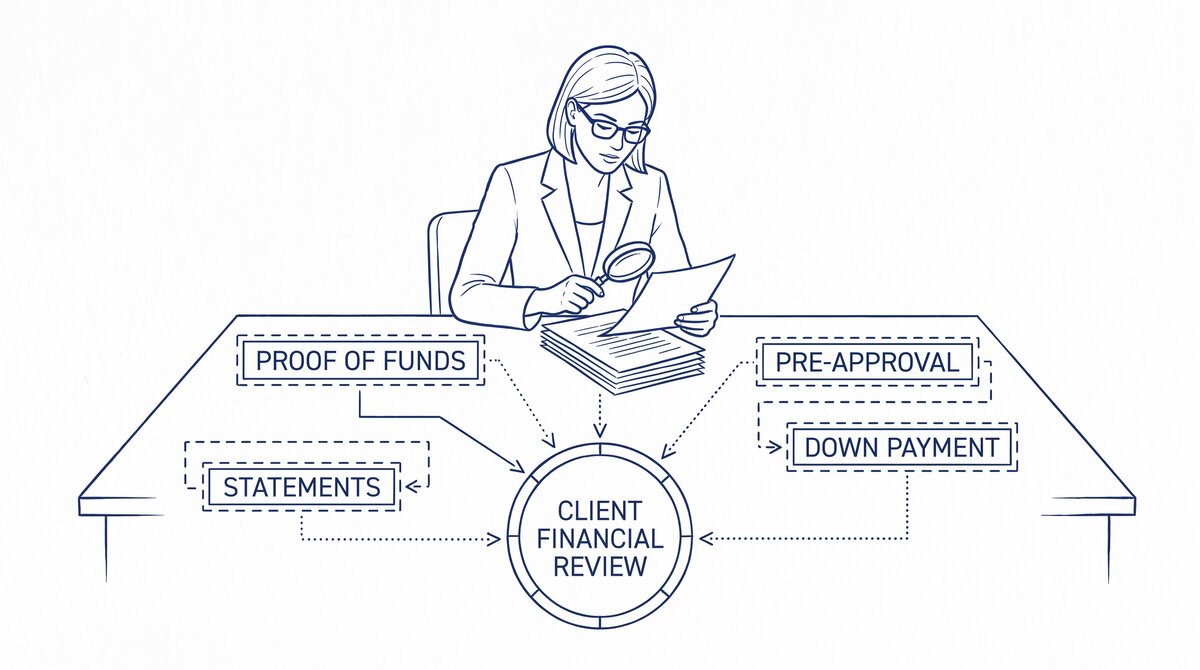

A real estate agent typically receives 4 documents from each client: proof of funds, 60-90 day bank statements, mortgage pre-approval letter, and down payment verification. Converting the statements to Excel or CSV lets the agent verify the client’s financial position in 5-15 minutes per statement, compared to 30-60 minutes for manual review. The 5 red flags to flag for the lender: large unexplained deposits, NSF history, irregular income, undisclosed debts, and source-of-funds concerns.
TL;DR. Real estate agents need to convert and review 4-8 client bank statements per transaction. The 4 documents: proof of funds, 60-90 day bank statements, mortgage pre-approval, down payment verification. The 3-step review workflow: convert to Excel, scan for the 5 red flags, summarize for the lender. The 5 red flags: large unexplained deposits, NSF history, irregular income, undisclosed debts, source-of-funds concerns. The 3 compliance considerations: Fair Lending, source-of-funds reporting, and client data privacy.
Why Real Estate Agents Need to Convert Client Statements
Real estate agents handle a high volume of client financial documents, especially for buyers who need mortgage financing. The agent’s role is not to underwrite the loan (that is the lender’s job) but to verify that the client’s financial position supports the offer and the down payment.
What most guides miss about this workflow is that the quality depends on the mechanism, not on the tool. Two tools that look different on the surface often run the same 4-step process underneath: read, find, parse, verify. The difference is in how well each step handles edge cases (merged cells, missing balances, non-standard date formats, scanned vs digital input). Choosing between tools based on UI alone misses the actual quality lever.
For a typical residential transaction, the agent reviews:
- 2-3 months of bank statements from the client’s primary checking account
- 2-3 months of statements from the client’s savings account
- Proof of funds for the down payment and closing costs
- The mortgage pre-approval letter from the lender
- Sometimes: investment account statements, retirement account statements, gift letters
The agent’s review is a sanity check, not a deep audit. The lender will do the deep audit. The agent’s job is to catch the obvious issues before the lender does, to avoid wasting time on a transaction that will not close.
Converting the statements to Excel or CSV lets the agent:
- Sum the deposits to verify the down payment is in the account
- Check for NSF (non-sufficient funds) history, which is a red flag for lenders
- Identify large unexplained deposits that may need source-of-funds documentation
- Verify the client’s stated income against the actual deposits
- Calculate the average balance to confirm the client can cover the down payment and reserves
The conversion takes 1-3 minutes per statement. The review takes 5-15 minutes per statement. Total: under 20 minutes per client, which is much faster than the 30-60 minutes for manual review.
The 4 Documents a Real Estate Agent Typically Receives
The 4 documents the agent receives from each client:
1. Proof of Funds
A letter or document showing that the client has the cash for the transaction. The proof of funds is typically a bank statement or a letter from the bank showing the balance.
For cash buyers (no mortgage), the proof of funds is the entire purchase price plus closing costs. For financed buyers, the proof of funds is the down payment plus closing costs plus reserves.
2. 60-90 Day Bank Statements
The most recent 2-3 months of bank statements from the client’s primary checking and savings accounts. The lender uses these to verify the client’s income, spending patterns, and cash position.
The agent’s role: scan the statements for the 5 red flags (see below) and confirm the client’s stated financial position matches the actual statements.
3. Mortgage Pre-Approval Letter
A letter from the lender stating that the client is pre-approved for a mortgage up to a certain amount. The pre-approval is based on the client’s stated income, assets, and credit score, and is conditional on the lender’s verification.
The agent’s role: confirm the pre-approval is current, the loan amount is sufficient for the purchase, and there are no unusual conditions.
4. Down Payment Verification
Documentation showing that the client has the down payment in their account. This may be part of the bank statements (showing the balance) or a separate letter from the bank.
The agent’s role: confirm the down payment is in the account, is not borrowed (which would change the loan terms), and is from an acceptable source.

Turn That PDF Into a Spreadsheet in Minutes
You've seen how to do it manually — now let the tool handle the heavy lifting. Upload your bank statement and get Excel, CSV, or QBO in a few clicks.
Try It FreeThe 3-Step Review Workflow
The 3 steps to review a client’s bank statements:
Step 1: Convert the Statements to Excel or CSV
Use a bank statement converter to convert each PDF statement to Excel or CSV. The conversion takes 1-3 minutes per statement.
For a typical client, the agent converts 4-8 statements (2-3 checking + 2-3 savings + investment if applicable). Total conversion time: 5-15 minutes.
Step 2: Scan for the 5 Red Flags
Open each converted file and scan for the 5 red flags (see next section). The scan is quick: most statements are clean, and the red flags are easy to spot.
For a typical statement, the scan takes 2-5 minutes. Total scan time for all statements: 10-30 minutes.
Step 3: Summarize for the Lender
Create a summary document for the lender that includes:
- The client’s name and account numbers (last 4 digits only)
- The statement period for each account
- The opening and closing balance for each account
- Any red flags identified
- Any large deposits that need source-of-funds documentation
The summary is usually a 1-page document that the agent sends to the lender along with the converted statements. The summary takes 10-15 minutes to create.
Total review time: 25-60 minutes per client. The agent can handle 5-10 clients per day with this workflow.
The 5 Red Flags to Flag for the Lender
The 5 red flags that should be flagged to the lender before the transaction moves forward:
Red Flag 1: Large Unexplained Deposits
Any deposit over a certain threshold (typically $5,000-$10,000) that is not from a regular source (payroll, transfer from a known account) needs source-of-funds documentation. The lender will require this documentation anyway, but flagging it upfront speeds up the process.
Red Flag 2: NSF History
Any non-sufficient funds (NSF) fee or overdraft indicates that the client’s cash flow is not stable. One or two NSFs in a 3-month period is a yellow flag; three or more is a red flag.
Red Flag 3: Irregular Income
For self-employed clients, the deposits should match the client’s stated income. If the deposits are significantly lower (or significantly higher) than the stated income, the lender will want to know why.
Red Flag 4: Undisclosed Debts
The statements may show payments to creditors that the client did not disclose. Common examples: personal loans, credit cards, buy-now-pay-later services. The lender will adjust the loan terms based on the actual debt-to-income ratio.
Red Flag 5: Source-of-Funds Concerns
If the down payment came from a source that the lender may not accept (e.g., a cash advance from a credit card, a personal loan, a gift from a non-family member), the lender will want to know. The agent’s role: flag the concern and let the lender decide.
The 3 Compliance Considerations
The 3 compliance considerations for real estate agents reviewing client financial documents:
Fair Lending
The agent must apply the same review standards to all clients, regardless of race, ethnicity, gender, religion, or other protected class. The agent cannot use the review to discriminate against any client.
The agent’s role: review all clients’ statements with the same rigor and the same red flag criteria. The review should be standardized, not subjective.
Source-of-Funds Reporting
If the agent sees signs of money laundering, fraud, or other illegal activity in the client’s statements, the agent may have a reporting obligation. The Bank Secrecy Act requires financial institutions to file Suspicious Activity Reports (SARs); real estate agents are not financial institutions but may have similar obligations under state law.
The agent’s role: be aware of the reporting obligations and consult with a compliance attorney if the review raises concerns.
Client Data Privacy
The client is sharing sensitive financial information with the agent. The agent must protect the data: store it securely, do not share with unauthorized parties, and delete it when the transaction is complete.
The bank statement privacy and security article covers the 5 questions to ask when using a third-party conversion service. The same principles apply when the agent is the recipient of the data.
A common failure mode bookkeepers report is treating this as a single operation rather than a chain of dependent steps. The temptation is to find a tool that ‘just works’ and stop investigating the mechanism. The result is a wrong-fix cycle: the tool gives partial output, the bookkeeper spends 30+ minutes troubleshooting, the fix is for the wrong step, and the same error recurs on the next statement. The fix: identify which step failed and apply the right intervention to that step.
When the Agent Should Refer to a Professional
Some situations require a professional beyond the agent:
When to Refer to a Tax Professional
If the client has complex tax situations (self-employment, multiple entities, foreign income), the agent should refer the client to a tax professional for advice on how the transaction affects the client’s tax position.
When to Refer to a Mortgage Broker
If the client’s financial position is borderline (low down payment, high debt-to-income, irregular income), the agent should refer the client to a mortgage broker who can identify the right loan program.
When to Refer to an Attorney
If the transaction involves complex legal structures (trust, LLC, estate), the agent should refer the client to a real estate attorney to ensure the structure is properly documented.
The bank statement converter is the main pillar this supports. The bank statement for applications covers the general use case. The bank statement for loan application covers the loan-specific case. The 2 month prep for mortgage application covers the time-specific prep. The 2 year prep for mortgage application covers the longer prep. The bank statement privacy and security is the client data trust angle. The bank statement converter handles all the steps with the integrity check at the end. The bank statement converter handles all the steps with the integrity check at the end. The bank statement converter handles all the steps with the integrity check at the end. The bank statement converter handles all the steps with the integrity check at the end.
From Bank Statement to QuickBooks-Ready File
That manual cleanup you just read about? This tool skips it. Turn your PDF into QBO for QuickBooks without storing your data anywhere.
Start Converting