
This guide covers bank-statement conversion for bookkeepers and accountants on US client engagements. It is the consolidated hub for the entire bookkeeper-resource cluster on this site. For related reading on the broader clusters, see the complete MCC guide, the complete US bank payment rails guide, and the expanded bank statement anatomy.
What this guide covers
Bank-statement conversion for bookkeepers and accountants is one of the highest-leverage workflows in any monthly close. Done well, it cuts hours per client. Done poorly, it propagates errors through the entire general ledger and complicates tax-time reconciliation.
This guide covers the consolidated bookkeeper workflow for US bank-statement conversion, including onboarding new clients, processing historical statements, reconciling through accounting software, handing clean deliverables to clients, and managing the audit trail. It is the hub for every bookkeeper-resource explainer on this site.
For the related reading on the broader clusters, see the complete MCC guide for the credit-card-side mechanics, the complete US bank payment rails guide for the bank-account-side mechanics, and the bank-statement anatomy pillar as a primer.
Onboarding a new client
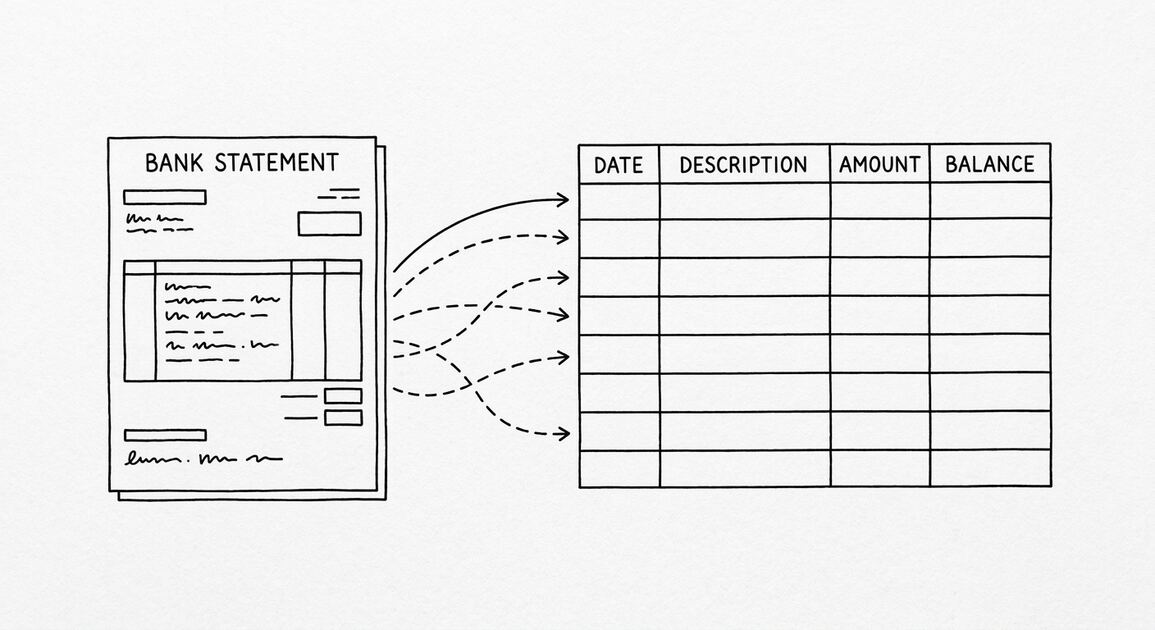
Step one: collect three to six months of bank statements from each account the client holds. Step two: convert each PDF to a four-column spreadsheet using a tool that preserves the merchant category code on credit-card statements and the ACH SEC code on bank-account statements.
Step three: build the categorization rule set. Use the MCC on credit-card statements and the SEC code on bank-account statements as the primary signals. Cross-reference each new vendor against the existing chart of accounts.
Step four: validate the rules against one month of statements. Step five: process the historical statements in chronological order. Step six: hand a clean deliverable to the client. The full onboarding workflow is covered at client onboarding.
Turn any PDF statement into a clean sheet
Skip the typos and the hours of copying. Our converter handles any bank statement format and outputs Excel, CSV, or QBO for QuickBooks. No file retention, free to try.
Convert your statementProcessing historical statements
For catch-up bookkeeping, the same six-step workflow runs month by month. The categorization rules built during onboarding apply to every subsequent month. The most common mistake is treating historical statements as separate jobs; instead, treat them as one continuous reconciliation across the catch-up period.
For multi-entity reconciliation across business accounts held by the same owner, the workflow needs a fifth step at the front: separate the categorization per business entity. The MCC and SEC codes do most of that work, but you may need an entity-id column. The detailed workflow is at multi-entity reconciliation.
For 1099 contractor bookkeeping, the merchant category codes on credit-card statements isolate contractor payments. The merchant description column is unreliable because contractors often submit payments via inconsistent gateways. The complete reading is at 1099 contractor bookkeeping from bank statement.

Reconciling through QuickBooks Online and Xero
QuickBooks Online bank feeds usually work without intervention for a small business. They flow transactions through and let the bookkeeper categorize. When the bank feed fails or the file is too large to feed, the manual conversion workflow picks up.
Xero bank feeds operate similarly. Reconciliation rules in Xero can use the merchant category code label inline within the merchant description on credit-card statements, and the ACH SEC code label inline within the description on bank-account statements. The bank-feed failure troubleshooting flow is at QuickBooks and Xero bank feed failure.
The verification step before import is critical. Run the variance between the converted spreadsheet’s running balance and the printed running balance on the bank statement. Any variance over $0.01 triggers a manual review. The verification workflow is at verify converted bank statement before import.
Monthly workflow
The monthly close workflow runs through five steps. Step one: collect the latest bank statement PDFs from the client’s bank portal. Step two: convert each PDF to a four-column spreadsheet using a tool that preserves the categorization signals.
Step three: import the converted spreadsheet into the accounting software. Use the categorization rule set built during onboarding. The import preserves the merchant category code label or ACH SEC code label inline within the description for downstream analysis.
Step four: reconcile the cleared vs uncleared balance against the printed running balance on the statement. Step five: deliver a clean monthly package to the client. The detailed workflow is at bookkeeper monthly workflow.
For the cross-functional reading on what each accounting software does differently, see bookkeeper quickbooks xero bank statement.
Quarterly and year-end close
Quarterly close adds two steps to the monthly workflow. Step one: run the bank-reconciliation variance report by account and by month. Step two: produce a quarterly package showing revenue, expenses, and net cash flow. The package includes the four-column statement set for each account.
Year-end close is the most rigorous. After the quarterly close steps, run the year-end tax-prep deliverables: prepare for the CPA, classify expenses into Schedule C or K-1 buckets, and reconcile to bank statements. The full audit-prep workflow is at audit prep five-year archive.
For 1099 contractors and other edge cases, the year-end close includes cross-referencing 1099-NEC filings against the contractor expense flow on the bank statement. The contractor bookkeeping workflow covers this.
Deliverables to clients
The standard client deliverable is a four-column statement summary with categorization, plus a one-page narrative covering notable transactions, anomalous patterns, and pending items. The deliverable format varies by client preference.
For monthly close packages, the deliverable goes out within five business days of the cycle end. For quarterly and year-end, the deliverable expands to include the year-to-date roll-up. The standard formats are at deliverable formats and client deliverables.
For accounting firms handing deliverables to a tax preparer, the format includes the schedule-C or K-1 cross-reference plus a transaction-level drilldown. The format is documented at month-end close workflow.
Frequently asked questions
What is the best tool to convert bank statements for bookkeeping? The four-column output (Date / Description / Amount / Balance) with the merchant category code label preserved inline within the merchant description on credit-card statements and the SEC code label preserved inline within the description onk-account statements. Most free PDF converters strip those columns.
A tool that preserves them cuts the work per client by half.
How many months of historical statements should a bookkeeper collect at onboarding? Three to six months for steady-state clients. Twelve months for catch-up engagements. The onboarding workflow collects the right amount based on the engagement type.
Can bank-statement conversion handle password-protected PDFs? Yes. Most bank portals apply customer-specific passwords to statement downloads. A converter that handles passwords without retyping is essential.
What about scanned-image statements? Most modern converters run OCR on scanned-image PDFs. The accuracy varies. For statements older than a few years, manual review is sometimes necessary.
The bottom line
Bank-statement conversion for bookkeepers is a high-leverage workflow when built correctly. The four-column output preserves the categorization signals that survive merchant-name truncation. The categorization rules carry the work from month to month.
For the consolidated reading on this and related workflows, see the complete MCC guide for the credit-card-side mechanics, the complete US bank payment rails guide for the bank-account-side mechanics, and the bank-statement anatomy primer.
Easy Statement Sheet reads bank statements and credit-card statements into the four-column output. The first three conversions are free, no card required. Plans start at $15 per month.
Working with multi-account clients
Clients with multiple bank accounts are common in small-business engagement. Each account needs its own conversion, but the categorization rules apply across accounts. Build the rule set per account type first, then unify into one master rule set.
For clients with personal and business accounts held by the same owner, treat them separately. The categorized expenses from the personal account feed Schedule A (if itemizing); the business account expenses feed Schedule C or the entity return. Mixing the two creates an audit-trail mess.
For clients with multiple business entities, the conversion per entity is the same workflow as a single-entity client. The deliverable per entity goes to the tax preparer separately. Most accounting software handles multi-entity via class or location tracking, so the conversion output preserves that column when set correctly.
Common pitfalls
Pitfall one: using the merchant description column as the primary categorization signal. Merchant descriptions truncate, abbreviate, and rotate through different processor names. Use the MCC or SEC code instead. Only resort to description-based rules when no code is present.
Pitfall two: not running the variance check between converted spreadsheet and printed running balance. The variance check catches errors that the eye would miss. Most converters run the check automatically; manual conversions need the check done by hand.
Pitfall three: relying on the bank feed for every statement. Bank feeds fail occasionally. The conversion workflow is the backup, and it needs to be ready to run on demand. For a regular cycle, the bank feed path covers 90 percent of transactions; the conversion path covers the remaining 10 percent plus historical catch-up.
Tooling – what to standardize across clients
Standardize the conversion tool across the firm’s clients. The four-column output format is now the common standard. Each conversion needs the same columns named the same way, the same date format, and the same dollar sign placement. Once standardized, the firm’s general-ledger templates work without per-client modification.
Standardize the categorization rule set. One master rule set per chart of accounts. Each client maps the rule set to their specific chart of accounts. The mapping is one workbook per client, and the rule set is reusable across new clients.
Standardize the deliverable format. One workbook per monthly close, one package per quarterly close, one bundle per year-end close. The format is templated, not bespoke per client. The standard formats live in the firm’s working papers.
Easy Statement Sheet supports this standardization. The four-column output is identical across clients when fed into the same accounting software.
How this fits the conversion workflow
For converting supported bank statement or credit-card statement PDFs into the four canonical columns, Easy Statement Sheet is one practical option. Choose the output by what happens next: XLSX for human review or spreadsheet analysis, CSV for software and data pipelines, Google Sheets-compatible for cloud-spreadsheet work, and QBO for QuickBooks import.
The service runs entirely in volatile memory; uploaded statement contents and converted financial data are not persistently retained.
Independent of any specific tool, the workflow is the same: extract, validate against the printed running balance, and route to the format your downstream workflow expects. Tools that preserve the four canonical columns plus the merchant category code label and rail label inline within the merchant description make the rule-based reconciliation layer scriptable across many clients.
Turn That PDF Into a Spreadsheet in Minutes
You've seen how to do it manually — now let the tool handle the heavy lifting. Upload your bank statement and get Excel, CSV, or QBO in a few clicks.
Try It Free