
Reconciling multiple months of bank statements at once is a different exercise from monthly reconciliation. In monthly reconciliation, you start from a known opening balance and resolve the small set of differences between the bank and your books.
In multi-month reconciliation, you have accumulated months of potential discrepancies, and the differences compound: a $50 mistake in January becomes a $550 cumulative error by November if not caught.
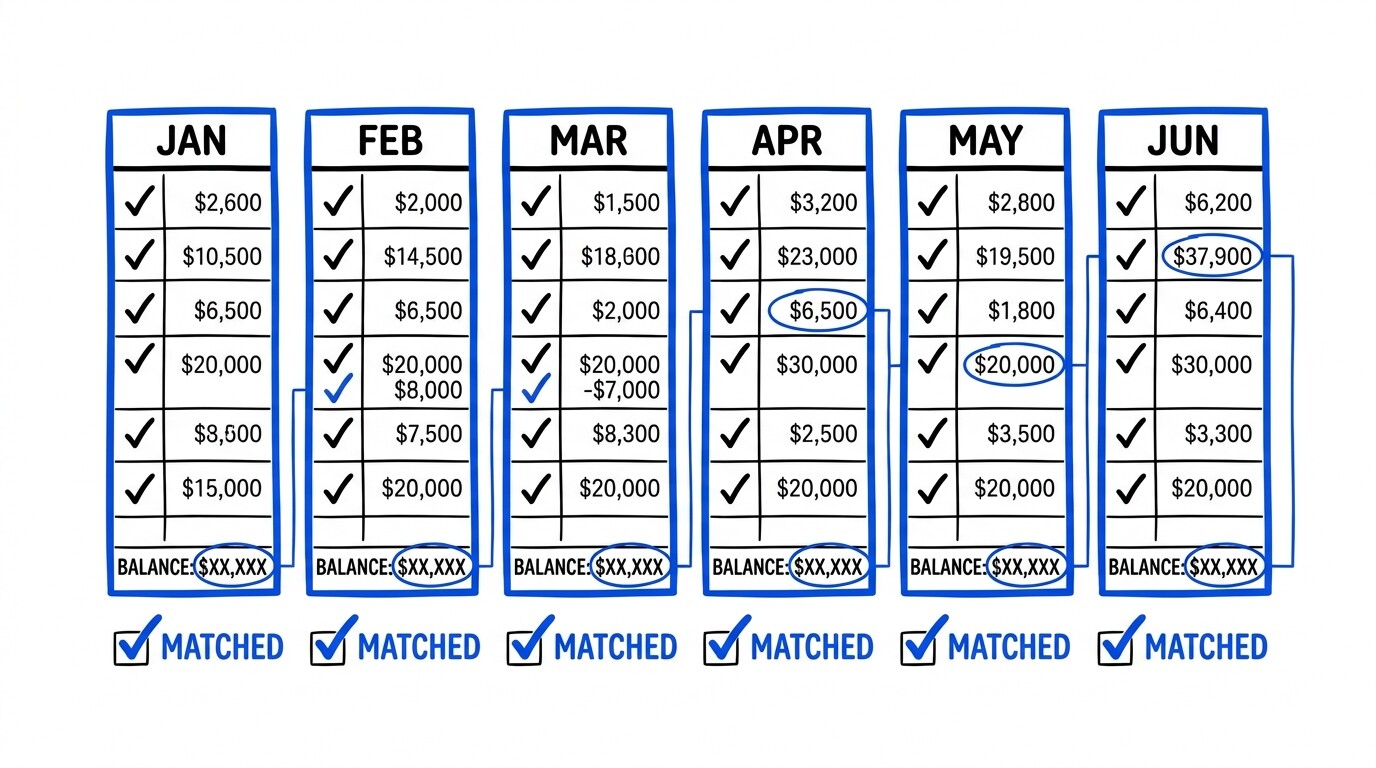
Quick Answers: Multi-month reconciliation works best as a chronological month-by-month workflow rather than a single end-of-period reconciliation. The approach: reconcile month 1 first (resolve any opening balance discrepancy), then month 2 against month 1’s reconciled ending balance, then month 3 against month 2’s ending balance, and so on. This prevents error compounding. For a 6-month reconciliation across 2 bank accounts and 1 credit card, expect 4-8 hours of focused work. The most common multi-month errors are: missed transactions, double-counted transactions, miscategorized transfers, and unrecognized bank fees/interest.
What makes multi-month reconciliation different from monthly reconciliation?
The key difference is error compounding. In monthly reconciliation, you have one month of discrepancies to resolve (typically 0-5 small differences). In multi-month reconciliation, you have N months of discrepancies, and each month’s reconciliation depends on the prior month’s reconciled balance. If month 1 has an unreconciled $200 discrepancy, month 2’s reconciliation will be off by $200 even if month 2 itself is perfect.
This is why the chronological month-by-month approach works better than the end-of-period reconciliation approach. The chronological approach catches and resolves each month’s discrepancies while the context is fresh (you still have the statement in front of you, you still remember the period’s events).
The end-of-period approach defers all discrepancies to a single resolution session, which is much harder because the context for each month’s transactions has faded.
The other difference is transaction matching volume. In monthly reconciliation, you match 150-300 transactions against your bookkeeping records. In multi-month reconciliation across 6 months, you have 900-1,800 transactions to match. The larger volume makes transaction matching more time-consuming but the per-transaction review is the same: verify the date, amount, payee, and category match between the bank statement and your books.
How do you reconcile month 1 first?
Month 1 reconciliation establishes the foundation.
There are six steps to month 1 reconciliation.
Step 1: start with the bank statement for month 1.
Step 2: confirm the opening balance matches your books’ starting balance for that month, or document the difference.
Step 3: review each transaction on the statement against your books.
Step 4: mark cleared transactions.
Step 5: identify any missing transactions, on statement but not in books, or in books but not on statement.
Step 6: calculate the ending balance for the statement and confirm it matches your books’ ending balance.
The opening balance discrepancy is the most common issue at month 1. If your books say the starting balance was $5,000 but the statement shows an opening balance of $4,750, you have a $250 discrepancy that must be resolved before month 1 reconciliation can complete.
Common causes: a prior bookkeeping error you haven’t found, a transaction that posted in the wrong period, an opening balance entry that was wrong, or a missing prior transaction.
To resolve the opening balance discrepancy: review the prior 1-2 months of statements (if available) and your books’ prior period activity, look for transactions that are in one source but not the other, check for bank fees or interest that may not have been recorded, and if all else fails, document the discrepancy as a prior-period adjustment with a note in your workpapers.
Some discrepancies are not resolvable (e.g., the prior bookkeeping was simply wrong, and you have no record to fix it), and the right treatment is a documented adjustment rather than a guess.
Turn That PDF Into a Spreadsheet in Minutes
You've seen how to do it manually — now let the tool handle the heavy lifting. Upload your bank statement and get Excel, CSV, or QBO in a few clicks.
Try It FreeHow do you proceed month-by-month after month 1?
For each subsequent month, the workflow is: (1) start with the prior month’s reconciled ending balance as your opening balance, (2) review each transaction on the new statement, (3) mark cleared transactions, (4) identify missing or extra transactions, (5) confirm the new ending balance matches your books.
Each month takes 10-30 minutes if month 1 was reconciled correctly, or longer if there are residual discrepancies from prior months.
The most common month-over-month issue is uncleared checks or pending transactions. If a check you wrote in month 2 has not cleared the bank by the end of month 2, it appears in your books but not on the month 2 statement.
In month 3, it may clear (and appear on the month 3 statement) or remain pending (still in your books but not on any statement).
The reconciliation treatment for an outstanding check that has not cleared is to leave it in your books and not mark it as cleared; the difference between your books’ balance and the bank statement’s balance is exactly the outstanding check amount, and the reconciliation is correct because both sides account for the same transactions.
Another common issue is automatic payments that posted to the bank in a different month than expected.
A client may have set up a recurring monthly payment to clear on the 15th, but the bank processes it on the 14th or 16th depending on weekends and holidays. This causes the transaction to appear on a different statement month than your bookkeeping expected.
The reconciliation treatment is to adjust the transaction date in your books to match the bank’s posting date (or vice versa, if you prefer the original transaction date), and document the discrepancy.

How do you handle transfers between accounts?
Transfers between the client’s own accounts are the single most common source of multi-month reconciliation errors.
A $1,000 transfer from checking to savings appears on both the checking statement and the savings statement, and it appears in the bookkeeping records as either one transaction (a transfer) or two transactions (a checking withdrawal and a savings deposit). The mismatch between bank records and bookkeeping records creates reconciliation differences that compound over multiple months.
The correct bookkeeping treatment for transfers is: in the checking account, record a $1,000 outflow categorized as “Transfer to Savings”; in the savings account, record a $1,000 inflow categorized as “Transfer from Checking”; the net effect on total assets is zero (the $1,000 left checking and entered savings).
In QuickBooks Online, this is typically done by categorizing both sides of the transfer to the same “Transfer” account on the chart of accounts.
The common error is to record only one side of the transfer (the checking withdrawal) without recording the savings deposit, or to record both sides but as income/expense instead of as transfers. The first error creates a $1,000 balance discrepancy in savings that compounds over many transfers. The second error inflates income and expenses, distorting the P&L.
The fix in both cases is to identify all transfer transactions and re-categorize them correctly.
What about credit card statement reconciliation?
Credit card statement reconciliation has additional complications compared to bank reconciliation. Credit card statements typically show: the previous statement balance, payments received, new purchases, fees and interest, and the new statement balance.
The reconciliation treatment is: confirm the prior statement’s balance matches your books, confirm the payment from your bank account matches the payment on the credit card statement, verify each new purchase matches a recorded transaction, and confirm the new balance matches your books.
The most common credit card reconciliation issue is pending transactions.
Credit card transactions typically take 1-3 days to “post” to the statement after the card is swiped. A purchase made on the last day of the statement period may not appear on that statement, only on the next one.
The reconciliation treatment is the same as for outstanding checks: leave the transaction in your books, mark it as pending, and accept that the statement balance will not match your books’ balance by exactly the pending transaction amount.
Another common credit card issue is payment timing.
A payment made from your bank account on January 28 may not be received and applied by the credit card company until February 2. This means January’s credit card statement does not show the January 28 payment, but February’s statement does.
The reconciliation treatment is to record the payment date as the date it was made (January 28) in your books, and accept that the bank’s posting date (February 2) is what appears on the statement.
The reconciliation is correct as long as both sides account for the same payment.
What is the role of the bank reconciliation report in QuickBooks?
QuickBooks Online has a built-in reconciliation tool that walks through the reconciliation process: select the account, enter the statement balance and statement date, check off cleared transactions, and review the difference.
The tool calculates the difference between the statement balance and your books’ balance, and you must resolve the difference to a zero before the reconciliation is complete.
For multi-month reconciliation, you typically run the reconciliation tool once per month per account. Each month’s reconciliation is a discrete event that should match to a $0 difference.
The reconciled status is visible in QuickBooks (each transaction has a “cleared” status, and each month has a “reconciled” status).
This creates an audit trail that the books have been verified against the bank records for each month in the period.
For clients who need to provide proof of reconciliation to lenders, investors, or tax authorities, the QuickBooks reconciliation report is the standard deliverable. The report shows the reconciled status of each account, the date of last reconciliation, and any unresolved differences. A complete multi-month reconciliation set is typically 3-6 months of monthly reconciliation reports, one per account.
What happens after multi-month reconciliation is complete?
After multi-month reconciliation, the books are accurate as of the end of the reconciled period, and the bookkeeper’s focus shifts to ongoing monthly reconciliation.
The transition from multi-month to monthly reconciliation typically involves: setting up bank feeds for all accounts (if available) to reduce manual data entry, creating bank rules in QuickBooks for recurring transactions to speed categorization, establishing a monthly reconciliation workflow (typically the 5th-10th of each month), and reporting any unresolved items to the client for clarification.
The value of multi-month reconciliation is not just the corrected books but also the framework for ongoing accuracy.
The chart of accounts is now customized to the client, the categorization rules are established, the bank reconciliation process is documented, and the client understands what is expected of them (e.g., timely statement delivery, prompt response to bookkeeper questions).
This foundation makes the recurring monthly engagement much smoother than the initial catch-up.
Turn PDF Bank Statements Into Workable Spreadsheets
Your bank statement is a mess of numbers, but your books shouldn't be. Use our converter to get Excel, CSV, or QBO files — ready for QuickBooks.
Try It Free Now